
Agent Memory
Working memory, durable conversation history, and curated user memory.
An ai-agent is stateless by default: each invocation starts a fresh
conversation. Set memoryThreadId and the agent loads the thread's prior
transcript before its run and saves it after, so the conversation persists
across invocations. This page covers what the block declares and how the
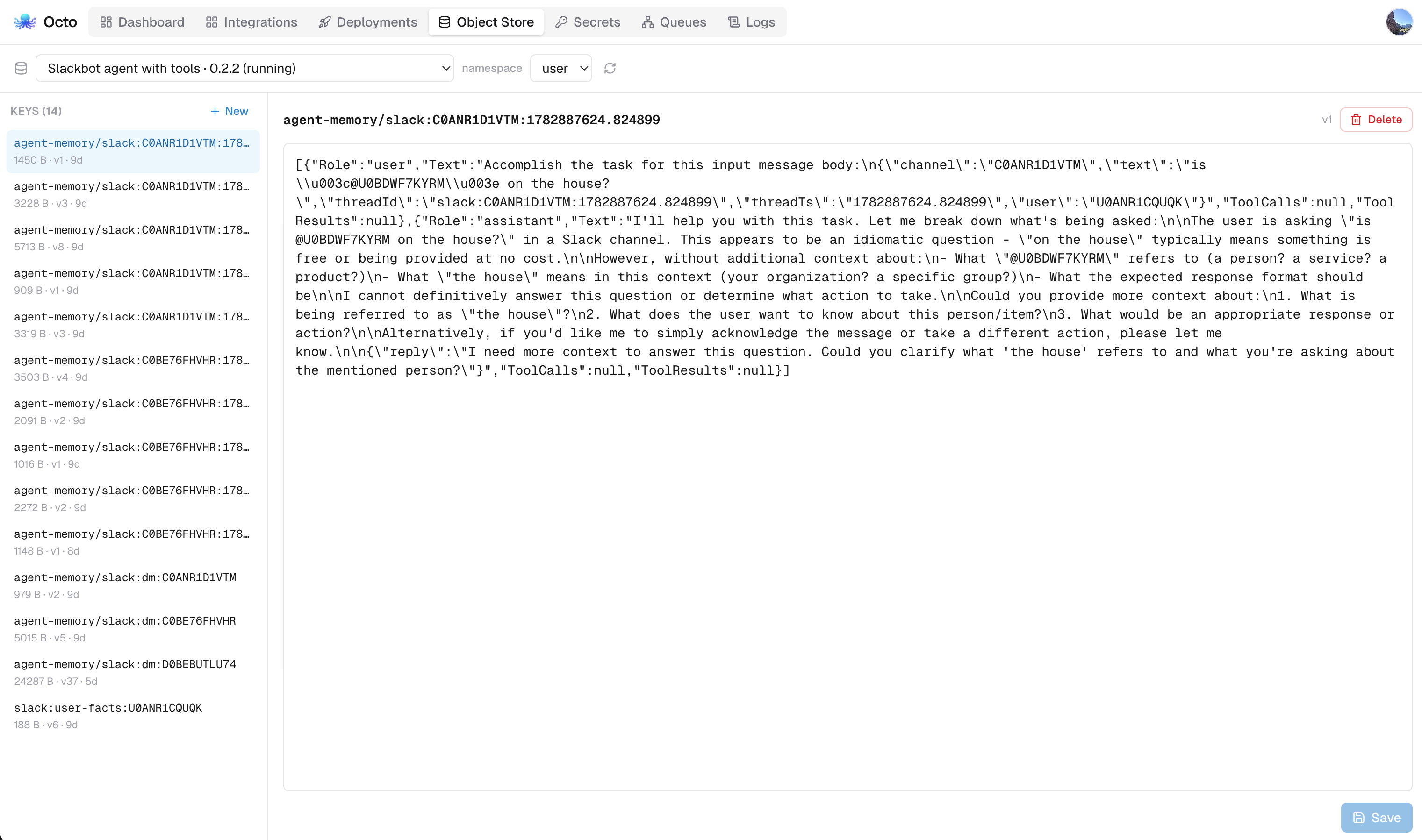
runtime keeps it; the platform's viewer for recorded memory is
Platform: Agent Memory.
Per-thread conversation memory
service:
  name: ai-agent-memory

env:
  - name: ANTHROPIC_API_KEY
    required: true

connectors:
  - name: claude
    type: llm-anthropic
    settings:
      apiKey: ${ANTHROPIC_API_KEY}

flows:
  - name: chat
    process:
      - type: ai-agent
        name: assistant
        connector: claude
        # Per-thread memory: load/save this thread's transcript around the run.
        memoryThreadId: body.threadId
        contextMaxTokens: 8000
        memoryCompaction: summarize
        prompt: >
          You are a helpful assistant in an ongoing conversation. Use the prior
          turns for context and answer the user's latest message. Respond with a
          JSON object {"reply": "..."}.
        tools:
          - name: remember_note
            description: Save a short note to scratch state for later in this task.
            inputSchema: |
              {"type":"object","required":["note"],"properties":{"note":{"type":"string"}}}
            process:
              - type: set-variable
                settings:
                  name: note
                  value: body.note
Invoke it twice on the same thread and the second turn remembers the first.
octo invoke --config samples/ai-agent-memory.yaml --flow chat \
  --data '{"threadId":"user-42","message":"My name is Sam."}'
octo invoke --config samples/ai-agent-memory.yaml --flow chat \
  --data '{"threadId":"user-42","message":"What is my name?"}'
Choosing a thread id
memoryThreadId is a CEL expression over the message, so the granularity is
yours: per user (body.userId), per channel, or per conversation. The
production Slack agent computes it upstream with a transform,
"slack:dm:<channel>" for direct messages and "slack:<channel>:<threadTs>"
for channel threads.
Transcripts are stored in the runtime KV store under a dedicated
agent-memory/ prefix in the user namespace, so they never collide with
object-read/object-write keys.
A thread id is the whole identity
A transcript is keyed by its thread id alone, so two ai-agent blocks that
resolve the same id share one conversation and save over each other. The easy
way to do that by accident is a nested agent in another agent's tool slot:
the tool branch runs on the caller's message, so vars.threadId is the obvious
expression in both blocks. Use the scope the runtime mints for every tool branch
instead:
# A conversation of its own, kept out of the store that is backed up.
memoryThreadId: vars.toolScope
memoryVolatile: true
vars.toolScope is stable for the caller's conversation and distinct per tool,
so a specialist called three times is the same specialist each time and two
specialists never share (see
what a tool branch is told).
Or leave memoryThreadId out: a specialist that answers once from a complete
brief has nothing to remember, as Dr. Octo's two specialists do.
toolScope is derived from the conversation, the calling block and the
tool, so it moves when the block does: rename the agent or move it into another
branch and its tools start again somewhere new. That suits scaffolding, not
history, which is why the recipe pairs it with memoryVolatile. One id shared
by several tools in a conversation has to be minted and memoized:
- type: set-variable                 # cache-scope caches the body, so stash the args
  settings: { name: args, value: body }
- type: cache-scope
  key: vars.threadKey
  ttl: "0"                           # the default 60s would re-mint mid-conversation
  body:
    process:
      - type: set-payload
        settings: { value: '{"id": uuid()}' }
- type: set-variable
  settings: { name: shared, value: body.id }
- type: set-payload
  settings: { value: vars.args }     # hand the tool its arguments back
That id is stored, so eviction is part of the design: a TTL, an
invalidate-cache on the same key, or a wiped store mints a new one and
whatever was keyed on it starts fresh.
Volatile memory
memoryVolatile: true puts an agent's transcripts in the volatile KV tier
(Redis in a cluster, process memory standalone) instead of the persistent one.
Use it for a conversation whose loss costs nothing, such as a specialist's
working transcript: the tier is bounded and evicts under LRU, so scaffolding
does not accumulate in the store the platform backs up. Never use it for a
conversation somebody will ask to see again; the tier may drop a value on a
restart. clear-agent-memory clears both tiers.
The runtime does not key a transcript by the block's address, since renaming
the block or moving it into an if would then silently lose its conversations.
When a run claims a conversation another live run in the same process is
already working, it logs a warning naming both blocks and the thread.
A transcript lives in the deployment's KV scope, so undeploying an integration erases the conversations it held and a reinstall starts everyone from nothing. A roll-out keeps them: it is the same deployment. See #362.
Token budget and compaction
contextMaxTokens (default 200000) caps the agent's whole prompt: system
instructions, tool schemas and conversation together, not the stored transcript
alone. The figure is what the provider reports it read each turn, so it is
directly comparable to the model's context window. The runtime has no
tokenizer; a chars/4 estimate, fitted against the provider's numbers as the run
goes, only apportions the measured total across messages when deciding where to
cut. A provider that reports no usage falls back to the estimate alone.
The budget applies with or without memory, since an agent can talk itself
past the model's window in a single run. When the prompt would exceed the
budget, the transcript is compacted with the memoryCompaction strategy, before
the turn that would have overflowed and again before saving:
| Strategy | Behaviour |
|---|---|
prune (default) | Drops the oldest turns until the transcript fits. Cheap and deterministic; old context is gone. |
summarize | Keeps the most recent turns that fit half the budget and asks the same LLM connector to fold the older turns into a single summary message, preserving facts and decisions. Falls back to pruning if the summary cannot be produced. |
Watching it happen
Compaction is bracketed by compaction_start and compaction_end events,
since summarize can take seconds. Both carry strategy and the context gauge
(contextTokens, contextMaxTokens); the end event adds after and
dropped. The gauge also rides on every turn_end, where the reading is
exact: the prompt the provider reported reading plus the reply it produced.
Compaction also writes an agent.compaction trace record with the same
figures, so even a prune that calls no model records when the agent forgot
something. A summary's model call is recorded separately as an llm.turn
marked purpose: memory-compaction.
Saving memory is best-effort: a failed save is logged and does not fail the flow. Memory is also persisted when the agent takes its guardrail path, so a refused turn still stays in the conversation.
A budget too small to hold even one exchange cannot be satisfied. Compaction keeps the most recent exchange, logs that the result does not fit, and leaves the fix to you.
Clearing a thread
The clear-agent-memory leaf block wipes a thread's stored transcript. It is
idempotent (clearing a missing thread is not an error) and passes the message
through unchanged:
  - name: forget
    process:
      - type: clear-agent-memory
        name: wipe-thread
        settings:
          threadId: body.threadId
      - type: set-payload
        settings:
          value: '{"cleared": true}'
First-class memory: agentId
Everything above is one object, the transcript the model replays, compacted to
fit a budget: both the working context, which has to shrink, and the only record
of the conversation, which shrinking destroys. Give the block an agentId and
the runtime stores three separate things instead:
      - type: ai-agent
        name: support
        connector: claude
        agentId: support-agent          # opts into first-class memory
        memoryThreadId: body.threadId
        userId: body.userId             # who is on the other side
        userMemory: true                # remember/forget/search_memory tools
        prompt: |
          Help the customer.
        tools: [...]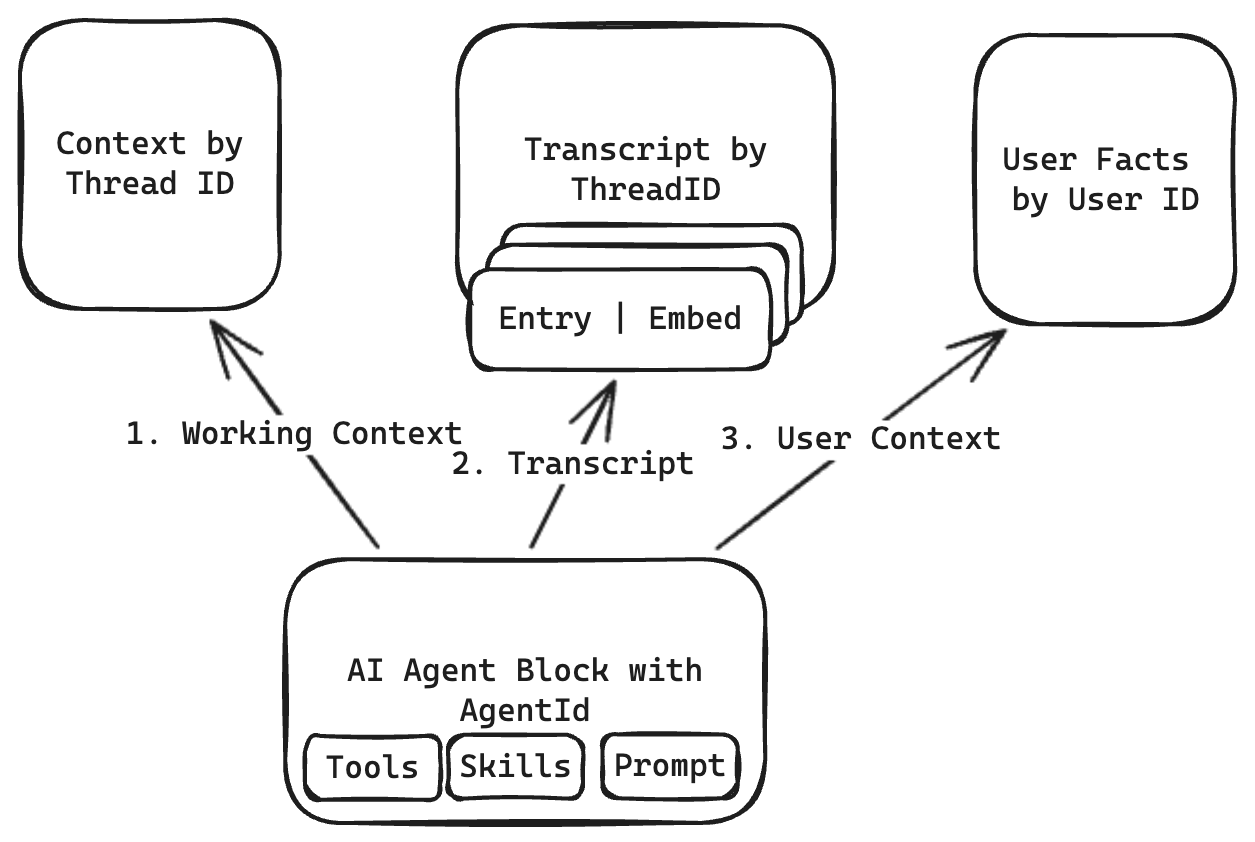
Three stores, two keys. The working context and the transcript are keyed by the
thread; the facts are keyed by the person. agentId is the namespace all three
sit in, which is why it is the setting that opts into any of this. A transcript
entry carries an embedding where a provider is configured, so searching memory
ranks by similarity and falls back to text matching where it is not.
| What it is | Compacted? | |
|---|---|---|
| Working memory | The transcript the model re-reads, checkpointed during the run so an interrupted agent resumes where it was | Yes; contextMaxTokens and memoryCompaction govern it |
| Conversation history | The turn-level record a person reads, and the platform lists and replays. It keeps the agent's opening turn verbatim | Never |
| User memory | Curated facts the agent chose to keep about someone, carried into later conversations | n/a; the agent writes and deletes these deliberately |
agentId is stated by you, never derived from the block's position, so renaming
or moving the block cannot destroy the conversations stored under it. It is
opt-in: history: record or userMemory: true without one is a build error
rather than a setting quietly ignored.
Two blocks declaring the same agentId share one memory, which is what
replicas of one logical agent want and two different agents almost never do.
The record is kept as it was sent
History records the agent's opening turn verbatim: the text the model was
handed, whatever the input expression made of it, including any context a
conversational agent's input carries beyond what was said. Trimming at write
time would serve one reader (an audit, a replay) by destroying the record for
every other, so the surface that composed the context is the one that renders
it back down.
Naming a conversation
Naming a conversation is a model call, so the runtime leaves it to a
nameThread slot. It runs once,
on the exchange that opens a conversation, is handed the question and the
answer, and whatever it returns becomes the title; an empty title names
nothing. The engine writes it, standalone into the thread's thread.json and
the platform onto the row. Without the slot the title is the opening question,
truncated.
What user memory gives the model
With userMemory: true the agent gets remember, forget and search_memory.
What it has already remembered is placed in every request, so it never has
to call a tool to find out what it knows. The preamble is bounded and never
written into the transcript, so correcting a memory between runs replaces it
rather than leaving stale copies. This replaces the hand-rolled fact store in
the last section; if you are starting now, use userMemory.
Where it is stored
Storage is the deployment's business, not the flow's:
| Working memory | Conversation history | User memory | Search | |
|---|---|---|---|---|
| Standalone | $OCTO_STORAGE_DIR/agent-memory/{agent}/threads/{thread}/working.json | .../turns.jsonl | .../users/{user}.json | Keyword |
| Platform | Orchestrator database | Orchestrator database | Orchestrator database | Semantic when the embedding server is deployed, keyword otherwise |
On standalone the directory is the index. An octo invoke with no
OCTO_STORAGE_DIR keeps the same structure in process and leaves nothing
behind. Every write carries a version, and a write against a version something
else has moved past is refused, so two replicas of one agent retry instead of
overwriting each other; appending turns is the exception, with sequence numbers
from the store.
On the platform a conversation is attributed to the person it was with, taken
from userId on the first write that names one and never reassigned. An agent
that records history without a userId records it belonging to nobody, and
nothing that lists by person will find it. The platform's tables and viewer are
described in Platform: Agent Memory.
Give clear-agent-memory the same
agentId and it removes the working memory, the recorded turns and the thread
itself.
Forwarding context to the store
Everything above is written by the runtime on its own behalf. No block in your flow sees working memory or a recorded turn, so there is nothing to wrap them in — which is a problem when the memory service needs something only the flow knows.
forwardContext is the channel for that. It is an expression evaluating to a
map, resolved once per run against the inbound message, and sent with every
memory call the run makes:
- type: ai-agent
  name: assistant
  connector: claude
  agentId: support
  memoryThreadId: 'vars.conversationId'
  forwardContext: '{"key": vars.dataKey, "tenant": vars.tenant}'
  prompt: You are a support agent.
  tools: []
It resolves from the message in flight rather than from configuration, and the runtime keeps no copy of it. That is the point: a value that has to reach the store on every call — a per-tenant encryption key, say — can travel with the request that carries it instead of being cached somewhere it would outlive the run.
Two things follow from where it is evaluated. It is read from the inbound
message, so a variable a tool branch sets later is not in it. And a
forwardContext that does not resolve to a map fails the run rather than
carrying on: the flow asked for something to travel with every write, and
writing without it is not the same operation.
What the memory service does with the map is the service's business. The
runtime only carries it, and an agent that declares no forwardContext sends
nothing at all.
The second layer: durable facts
This section predates userMemory, which does the same job as a built-in. The
tools below cost a round trip the model had to remember to make, and kept every
fact in one KV object capped at 200 items because core.KV cannot list. The
pattern stays as a worked example of flow-backed tools and for deployments still
running it. Dr. Octo used to be the reference implementation of this. He now
sets userMemory: true and the three flows are gone.
For facts that should survive across conversations ("prefers Celsius", "leads
the billing team"), the production Slack agent adds a layer the agent manages
itself: two tools backed by the object store, plus a skill teaching the model
when to use them. The tools are sourceless flows invoked via flow-ref.
remember_user_fact appends one bullet to a per-user document;
retrieve_user_facts reads it back:
  - name: remember-user-fact
    process:
      - type: object-read
        settings:
          key: vars.userFactsKey     # e.g. "slack:user-facts:U123"
          as: existingUserFacts
          default: '{"facts": ""}'
      - type: set-variable
        settings:
          name: updatedUserFacts
          value: string(vars.existingUserFacts.facts) + "- " + string(body.fact) + "\n"
      - type: object-write
        settings:
          key: vars.userFactsKey
          value: '{"facts": vars.updatedUserFacts}'
      - type: set-payload
        settings:
          value: '{"stored": true, "fact": body.fact}'
A user_memory skill tells the agent the policy: recall near the start of a
turn, store only stable, self-contained facts, never announce it.
Store: when the user shares a stable preference, personal fact, working style, recurring context, or anything that would help future replies, call
remember_user_factwith one short standalone fact. Keep each fact self-contained ("Prefers Celsius", "Works in the Berlin office") rather than a snippet of the chat.
The transcript gives short-term context for free; the fact store gives cross-conversation knowledge under rules you author. See the Slack agent capstone for the full walkthrough and Skills and Tools for how skills and flow-backed tools work.