
Capstone: A Production Slack Agent
A complete Slack AI agent with memory, tools, skills, and async processing.
This page walks through a production Slack chatbot built on the
ai-agent block, with the real YAML it runs on: conversation
memory, flow-backed
tools and lazy-loaded skills,
ai-mapping for output shaping, async event processing,
durable storage, and error handling throughout.
What you're building
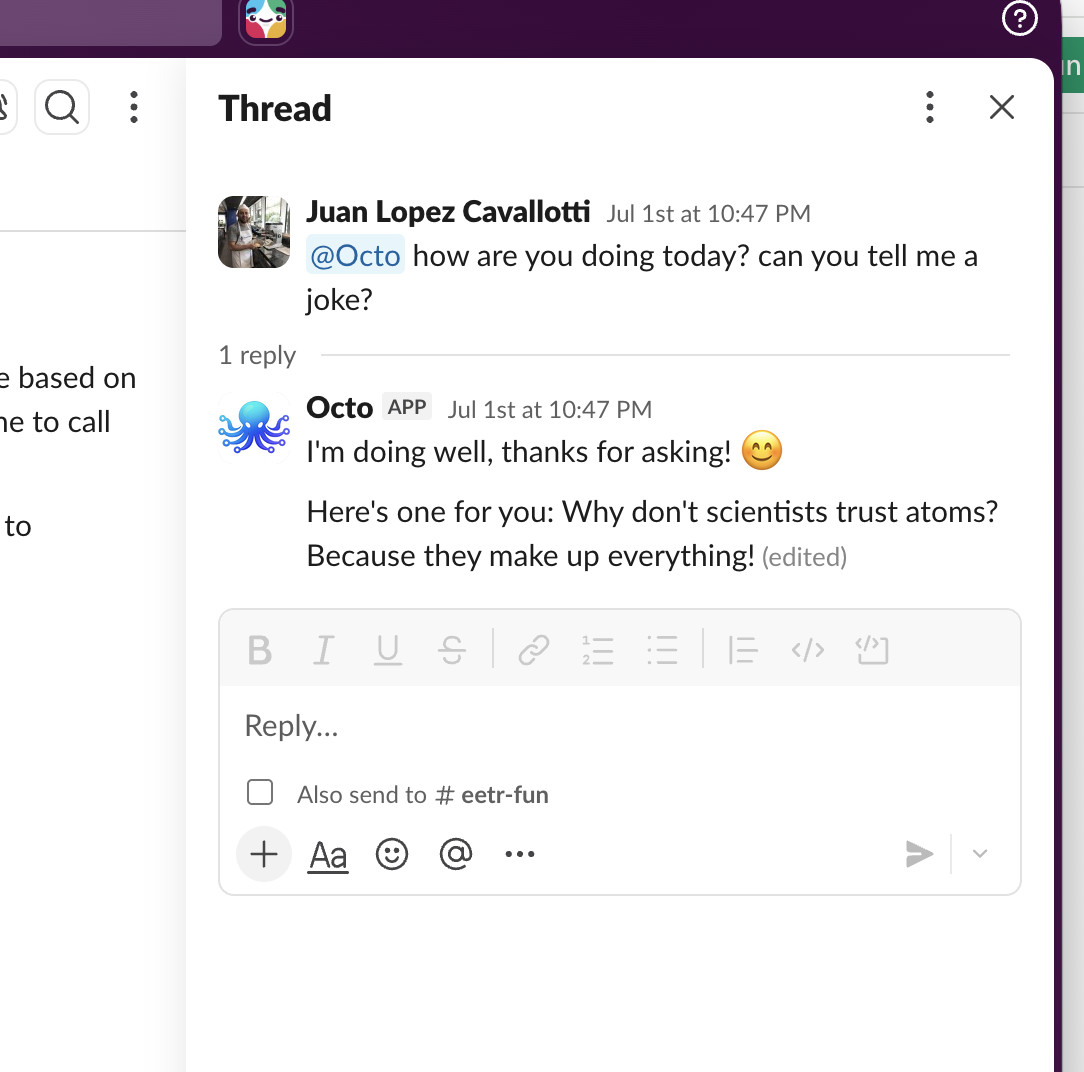
A Slack bot you can DM or @mention in a channel. It holds a conversation with per-thread memory, remembers durable facts about you across conversations ("prefers Celsius", "works in the Berlin office") in the object store, and looks up live weather for any place on Earth, Slack profiles, and 2022 World Cup results. It acks Slack within its 3-second deadline, shows a ":thinking_face: Thinking..." placeholder, and then edits that message in place with the final, Slack-formatted answer.
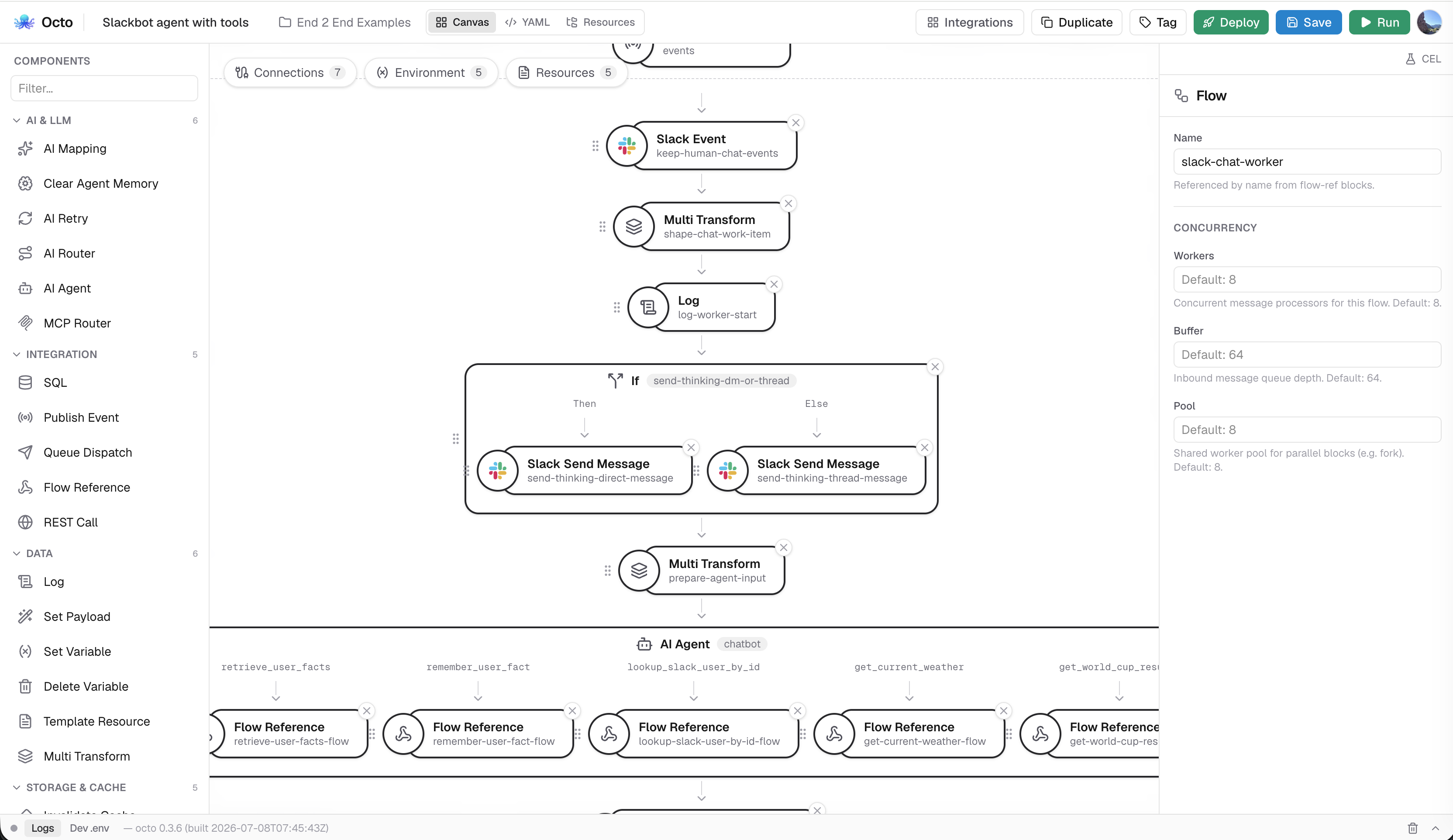
Architecture at a glance
One integration, eight flows. The request path:
- Slack POSTs an event to
/slack/events(HTTP source, raw body). slack-verify-requestchecks the signature.- The flow acks immediately: it publishes the event to an internal topic
with
publish-eventand returns{"ok": true}. - A worker flow subscribes to that topic with 8 concurrent listeners.
- A
slack-eventblock filters to human messages (DMs and @mentions, never bot messages, which prevents infinite loops). - A
multi-transformcomputes a memory thread id (DM vs. channel thread) and a per-user facts key. slack-send-messageposts the thinking message; its timestamp is saved.- The
ai-agentruns: thread memory, 4 skills, 5 flow-backed tools. - An
ai-mappingblock reformats the reply as Slack mrkdwn. slack-update-messagereplaces the thinking message with the answer.
Each of the 5 tools is a sourceless flow invoked via flow-ref, and every flow
has an error: chain.
1. Fast acknowledgement
Slack retries any event not acknowledged within about 3 seconds, and an LLM turn with tool calls can take far longer, so the receiving flow only verifies, hands off, and acks.
  - name: slack-chat-events
    source:
      connector: api
      type: http
      settings:
        path: /slack/events
        headers:
          - X-Slack-Signature
          - X-Slack-Request-Timestamp
        rawBody: true
        timeout: 5s
    process:
      - type: slack-verify-request
        settings:
          connector: slack
          timestampHeader: X-Slack-Request-Timestamp
          signatureHeader: X-Slack-Signature
      - type: if
        name: slack-url-verification
        condition: has(vars.slackChallenge)
        then:
          process:
            - type: set-payload
              settings:
                value: '{"challenge": body.challenge}'
        else:
          process:
            - type: publish-event
              name: publish-verified-slack-event
              settings:
                subject: '"slack-chat-events"'
            - type: set-payload
              name: acknowledge-slack-event
              settings:
                value: '{"ok": true}'
    error:
      - type: log
        name: log-error
        settings:
          level: error
          full: true
          message: '"slack event receiver error: " + string(vars.error.message)'
      - type: multi-transform
        name: build-error-response
        settings:
          transforms:
            - setVar: httpStatus
              value: "500"
            - setBody: '{"status":"error","message":vars.error.message,"flow":vars.error.flow,"block":vars.error.block}'
Slack's signature is computed over the raw request bytes, so rawBody: true
keeps the body unparsed until slack-verify-request sees it. That block also
handles Slack's one-time URL-verification handshake: it sets
vars.slackChallenge, and the if echoes the challenge back. publish-event
broadcasts to an in-process topic and returns immediately, so Slack gets
{"ok": true} in milliseconds while the work happens on the other side of the
topic, the standard pattern for any webhook with a delivery deadline (see
Events and Queues).
2. The worker and event filtering
The worker flow consumes the topic with an events source. listeners: 8
gives eight concurrent workers, so one slow LLM turn does not queue up everyone
else's messages.
  - name: slack-chat-worker
    source:
      connector: slack_events
      type: events
      settings:
        subject: slack-chat-events
        listeners: 8
    process:
      - type: slack-event
        name: keep-human-chat-events
        settings:
          eventTypes:
            - app_mention
            - message
          filter: body.botId == null && !has(body.raw.bot_id) && !(has(body.raw.subtype)
            && body.raw.subtype == "bot_message") && (body.type == "app_mention"
            || (body.type == "message" && has(body.raw.channel_type) &&
            body.raw.channel_type == "im"))
The slack-event block parses the envelope and drops anything that does not
match. The bot-loop guard
(body.botId == null && !has(body.raw.bot_id) && subtype != "bot_message")
drops every bot-authored message, including the bot's own replies and thinking
messages, which Slack delivers right back; skip it and the bot answers itself
forever. The audience rule keeps only an app_mention or a direct message
(channel_type == "im"). A dropped message ends the flow with no error and no
reply.
3. Memory thread identity
The agent's conversation memory is keyed by a thread id you compute, and the key decides what "one conversation" means:
      - type: multi-transform
        name: shape-chat-work-item
        settings:
          transforms:
            - setVar: channel
              value: body.channel
            - setVar: isDirectMessage
              value: body.type == "message" && has(body.raw.channel_type) &&
                body.raw.channel_type == "im"
            - setVar: threadTs
              value: "vars.isDirectMessage ? null : (body.threadTs == null ? body.ts :
                body.threadTs)"
            - setBody: '{"threadId":vars.isDirectMessage ? "slack:dm:" + string(vars.channel)
                : "slack:" + string(vars.channel) + ":" +
                string(vars.threadTs),"user":body.user,"userMention":"<@" +
                string(body.user) + ">","userFactsKey":"slack:user-facts:" +
                string(body.user),"text":body.text,"channel":vars.channel,"isDirectMessage":vars.isDirectMessage,"threadTs":vars.threadTs}'
            - setVar: chatRequest
              value: body
A DM gets slack:dm:<channel>, one continuous conversation per person. A
channel mention gets slack:<channel>:<threadTs>, one conversation per
Slack thread; a mention outside a thread starts one (its own ts becomes the
thread root). The same transform builds userFactsKey
(slack:user-facts:<user>), the object-store key for the memory tools below,
and userMention (<@U123>), so the agent can address people and Slack
renders their display name.
4. The thinking-message UX
Even with fast ack, the user stares at nothing while the agent thinks. The worker posts a placeholder first, threaded in channels and plain in DMs:
      - type: if
        name: send-thinking-dm-or-thread
        condition: vars.isDirectMessage
        then:
          process:
            - type: slack-send-message
              name: send-thinking-direct-message
              settings:
                connector: slack
                target: vars.channel
                text: '":thinking_face: Thinking..."'
        else:
          process:
            - type: slack-send-message
              name: send-thinking-thread-message
              settings:
                connector: slack
                target: vars.channel
                threadTs: vars.threadTs
                text: '":thinking_face: Thinking..."'
      - type: multi-transform
        name: prepare-agent-input
        settings:
          transforms:
            - setVar: thinkingTs
              value: vars.slackTs
            - setBody: vars.chatRequest
            - setVar: currentDate
              value: string(now)
            - setBody: '{"threadId":body.threadId,"user":body.user,"userMention":body.userMention,"userFactsKey":body.userFactsKey,"text":body.text,"channel":body.channel,"isDirectMessage":body.isDirectMessage,"threadTs":body.threadTs,"currentDate":vars.currentDate}'
slack-send-message puts the sent message's timestamp in vars.slackTs;
the transform saves it as vars.thinkingTs, the handle for editing the message
in place in step 8. It also restores the shaped chat request as the body and
stamps currentDate, so the agent can resolve "tomorrow".
5. The agent definition
The center of the integration: prompt, memory, tools, skills.
      - type: ai-agent
        name: chatbot
        connector: claude
        prompt: >
          You are a helpful chatbot inside Slack. Keep a warm, lightly playful,
          workplace-appropriate voice; load the voice skill for how to strike
          that tone. Use memory from this Slack conversation to maintain context
          across turns. The message body includes user, the Slack user id,
          userMention, a Slack mention string such as <@U123>, and currentDate,
          the current runtime date/time. Use body.currentDate as the reference
          point for relative dates like today, tomorrow, yesterday, this week,
          and next week. When directly addressing the person who messaged you,
          use body.userMention so Slack renders their display name. You have
          tools for durable per-user memory, Slack profile lookups, and live
          weather; load the matching skill before you lean on one so you use it
          well. Answer the user's latest message naturally. Return only the
          Slack message text to send back. Do not return JSON. Do not use
          markdown code fences. Do not mention implementation details, memory
          storage, or Slack internals unless the user explicitly asks about
          them.
        memoryThreadId: body.threadId
        contextMaxTokens: 12000
        memoryCompaction: summarize
The claude connector is an llm-anthropic connector with
model: claude-haiku-4-5 and maxTokens: 1200; a small, fast model is plenty
when the heavy lifting happens in tools. The 12,000-token budget covers the
agent's whole prompt (system instructions, tool schemas and conversation), and
the transcript is summarized rather than pruned when it would overflow, so
long conversations keep their gist. See Agent Memory.
The prompt encodes three production lessons: anchor relative dates to
body.currentDate, since models otherwise guess; address users via
body.userMention so Slack renders a display name; and demand plain text out,
no JSON and no code fences, because the reply feeds a formatting step.
Two memory layers
The integration uses two memory layers:
| Conversation memory | Durable user facts | |
|---|---|---|
| Mechanism | Built into ai-agent (memoryThreadId) | Agent-managed tools over the object store |
| Scope | One thread (body.threadId) | One user, across all conversations |
| Lifetime | Token-budgeted, compacted | Until overwritten |
| Written by | The runtime, automatically | The model, deliberately (remember_user_fact) |
The built-in memory makes turn two coherent; the fact store makes next month's conversation personal.
6. Tools as sourceless flows
Each of the five tools delegates to a sourceless flow (a flow with no
source, callable by name) via flow-ref:
        tools:
          - name: retrieve_user_facts
            process:
              - type: flow-ref
                name: retrieve-user-facts-flow
                settings:
                  flow: retrieve-user-facts
            description: Retrieve durable Markdown bullet-list facts previously stored for
              the Slack user who sent the current message. Call this once near
              the start of each turn.
            inputSchema: |
              {"type":"object","properties":{}}
          - name: remember_user_fact
            process:
              - type: flow-ref
                name: remember-user-fact-flow
                settings:
                  flow: remember-user-fact
            description: Store one short durable fact or preference for the Slack user who
              sent the current message. Use only for stable information that
              will help future replies.
            inputSchema: |
              {"type":"object","required":["fact"],"properties":{"fact":{"type":"string","description":"One short standalone fact or preference to remember about the current Slack user."}}}
          # ... lookup_slack_user_by_id, get_current_weather,
          #     get_world_cup_results: same flow-ref pattern
Sourceless flows are independently testable (invoke them by name with sample input), reusable, and keep the agent block readable. See Composing Flows.
The durable-memory pair
The two fact tools are the object-store pattern in full. Reading, with a
default that makes a missing key a non-event:
  - name: retrieve-user-facts
    process:
      - type: object-read
        name: read-user-facts
        settings:
          key: vars.userFactsKey
          as: userFacts
          default: '{"facts": ""}'
          existsVar: userFactsExists
      - type: set-payload
        name: return-user-facts
        settings:
          value: '{"facts": string(vars.userFacts.facts), "exists": vars.userFactsExists}'
    error:
      - type: log
        name: log-retrieve-user-facts-error
        settings:
          level: error
          full: true
          message: '"retrieve-user-facts flow error key=" + string(vars.userFactsKey) + "
            error=" + string(vars.error.message)'
      - type: set-payload
        name: return-retrieve-user-facts-error
        settings:
          value: '{"facts":"","error":vars.error.message}'
And writing: read the current facts, append one Markdown bullet, write back.
  - name: remember-user-fact
    process:
      - type: object-read
        name: read-existing-user-facts
        settings:
          key: vars.userFactsKey
          as: existingUserFacts
          default: '{"facts": ""}'
          existsVar: existingUserFactsExists
      - type: set-variable
        name: build-updated-user-facts
        settings:
          name: updatedUserFacts
          value: string(vars.existingUserFacts.facts) + "- " + string(body.fact) + "\n"
      - type: object-write
        name: write-user-facts
        settings:
          key: vars.userFactsKey
          value: '{"facts": vars.updatedUserFacts}'
      - type: set-payload
        name: return-stored-user-fact
        settings:
          value: '{"stored": true, "fact": body.fact, "facts": vars.updatedUserFacts,
            "existed": vars.existingUserFactsExists}'
    error:
      - type: log
        name: log-remember-user-fact-error
        settings:
          level: error
          full: true
          message: '"remember-user-fact flow error key=" + string(vars.userFactsKey) + "
            error=" + string(vars.error.message)'
      - type: set-payload
        name: return-remember-user-fact-error
        settings:
          value: '{"stored": false, "fact": body.fact, "error": vars.error.message}'
Tool arguments arrive as body (here, body.fact), while vars, including
vars.userFactsKey from step 3, flow through from the worker. The model never
sees or chooses the storage key; the flow pins it to the actual sender.
The other three, briefly
| Tool | Implementation |
|---|---|
lookup_slack_user_by_id | A slack-lookup-user block (by: id, user: body.userId) whose result is reshaped into a compact profile JSON: name, real name, team id, time zone, bot/deleted flags. |
get_current_weather | A two-API chain: a rest call to OpenStreetMap Nominatim geocodes body.location to coordinates, then an if on size(body) > 0 branches. Found: a rest call to Open-Meteo's forecast endpoint (honoring the model's temperatureUnit argument via a has() ternary) and a rich {"ok": true, ...} payload. Not found: a clean {"ok": false, "error": "No matching location found"} instead of a crash. |
get_world_cup_results | One rest call to api-football (fixtures, league 1, season 2022), then a multi-transform whose CEL filter(...).map(...) chain applies the model's optional round/team filters and reshapes each fixture to {date, round, status, home, away, score, penalties}, trimming a huge API response to what the model needs. |
7. Skills
Four skills ride along. Each is a template
resource the model lazy-loads: the system prompt advertises only names and
descriptions plus an implicit load_skill tool, and the model pulls in a
skill's full text when it decides it is relevant.
        skills:
          - name: voice
            description: How to strike the bot's warm, playful, workplace-appropriate tone.
              Load this before writing a reply.
            resource: voice
          - name: user_memory
            description: When and how to recall stored facts about the Slack user and store
              durable new ones. Load this near the start of a turn.
            resource: user_memory
          - name: slack_profiles
            description: When and how to look up a Slack user's profile by id. Load this
              when identity or profile details matter.
            resource: slack_profiles
          - name: weather
            description: How to fetch current weather and translate Open-Meteo weather codes
              into plain language. Load this for weather questions.
            resource: weather
The skills are Markdown files. Here is skills/voice.md in full; it is
written to the model, with concrete do/don't lists:
# Voice & tone

You're warm, upbeat, and a little playful: the kind of helpful coworker people
actually enjoy pinging. Keep it professional enough for a work Slack.

Do:
- Lead with the answer, then add personality; never make someone dig past a joke to get help.
- Be conversational and human: contractions, plain words, a light touch of wit.
- Drop in the occasional well-placed emoji (👍, ✨, 🌤️) when it adds warmth. One is plenty.
- Be encouraging when someone's stuck, and cheer small wins.
- Match the user's energy: playful when they're playful, focused when they're heads-down.
- Greet or thank people with body.userMention so it feels personal.

Don't:
- Don't force jokes, and never pun your way through a serious or urgent question.
- Don't be sarcastic at the user's expense, snarky, or ironic in a way that could sting.
- No pet names ("buddy", "champ"), no over-familiarity, nothing a manager would wince at.
- Don't pile on emoji or exclamation points: enthusiasm, not caffeine.
- Keep humor inclusive and kind; it's never at anyone's expense.

Rule of thumb: friendly barista, not stand-up comedian. If a line wouldn't land
well in a mixed team channel, dial it back.
user_memory.md tells the model when to call retrieve_user_facts and what
makes a fact worth storing (short, standalone, stable: "Prefers Celsius", not a
chat snippet); slack_profiles.md says when a profile lookup improves an answer
and to use body.user for the sender; weather.md maps Open-Meteo's numeric
weather_code values to plain language ("0: clear", "95 to 99: thunderstorm")
and says to lead with temperature and conditions. The tool gives the model
the capability; the skill teaches it when and how to use it.
8. Formatting for Slack
The agent returns prose. Slack wants mrkdwn, where bold is *bold* and links
are <url|label>, so a dedicated ai-mapping block does
the formatting under a strict output contract instead of the chat prompt:
      - type: set-payload
        name: prepare-reply-for-slack-formatting
        settings:
          value: '{"text": string(body)}'
      - type: ai-mapping
        name: format-reply-as-slack-markdown
        settings:
          connector: claude
          maxTokens: 1200
          prompt: >
            Format the text for Slack mrkdwn so it is easy to read in Slack.
            Preserve the meaning and facts exactly. Keep it concise. Use Slack
            markdown conventions: short paragraphs, bullets with -, *bold* for
            important labels, inline code only for commands, ids, filenames, or
            literal values, and links as <https://example.com|label> when a URL
            and label are present. Do not add greetings, signatures, commentary,
            JSON, or code fences. Return only an object with a text string.
          outputExample: |
            {"text":"Here is a clearer Slack-ready reply."}
          outputSchema: |
            {"type":"object","required":["text"],"properties":{"text":{"type":"string"}}}
      - type: slack-update-message
        name: update-thinking-message-with-reply
        settings:
          connector: slack
          channel: vars.channel
          timestamp: vars.thinkingTs
          text: string(body.text)
The outputSchema guarantees the next block always finds body.text. Then
slack-update-message closes the loop from step 4: same channel, the saved
vars.thinkingTs timestamp, new text. The user watches ":thinking_face:
Thinking..." turn into the answer.
9. Error handling throughout
Every flow ends with an error: chain under one rule: log fully, then return
a shape the caller can survive. The HTTP receiver returns a structured 500
(vars.error.message, .flow, .block) so Slack's dashboard shows something
diagnosable. The worker logs with full: true, the complete message state at
failure time. Every tool flow returns {"ok": false, "error": ...} (or
{"stored": false, ...}, {"facts": "", ...}) instead of failing the agent's
turn, so the model can apologize, retry with a different argument, or answer
without the tool, rather than leave a dead thinking message in the channel.
Design every tool's failure payload as carefully as its success payload. See
Error Handling for error: chain semantics.
Adapting this to your own agent
The skeleton transfers to almost any chat-surface agent. Keep the four-stage
spine (verify/ack, filter, agent, format/deliver) and swap the edges: a Teams or
Discord webhook in, a different delivery block out. Choose your thread identity
first (DM-scoped, thread-scoped, or ticket-scoped), since it defines what the
bot remembers. Use one sourceless flow per tool, each with an error chain that
returns {"ok": false}, and test tools by invoking the flow directly.
Put judgment in skills, not the prompt: the prompt says who the agent is, skills
say how to use each capability. Never let the model pick storage keys; compute
identity-bearing values (like userFactsKey) in the flow from the verified
event. contextMaxTokens caps the size of the prompt, not the bill, and
summarize compaction keeps the gist of a long thread at the cost of a model
call of its own.
The full YAML on this page is production-quotable; declare the env vars
(SLACK_BOT_TOKEN, SLACK_SIGNING_SECRET, ANTHROPIC_API_KEY, and optionally
API_FOOTBALL_KEY) and it runs.
Related pages
- Agentic self-healing: an alert-triage agent that reports into a Slack thread and asks there before it fixes anything.
- AI Agents: the
ai-agentblock reference. - Agent Memory: thread ids, token budgets, compaction.
- Agent Skills and Tools: the tool/skill model.
- Slack Bot guide: the Slack connector and blocks, from app setup onward.