
Call External APIs
Use the HTTP client with auth, retries, and response caching.
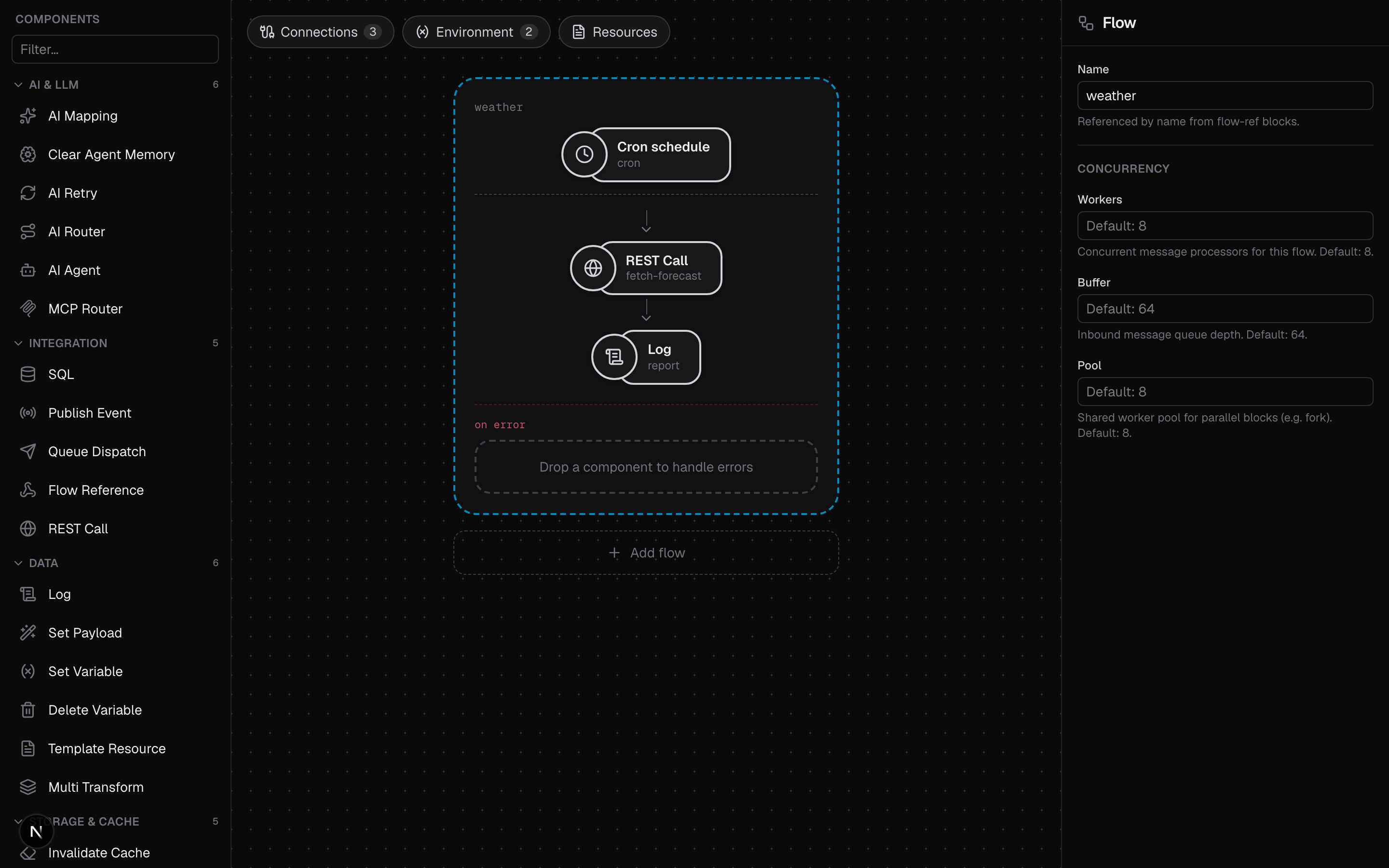
This guide calls an external HTTP API with the http-client connector and the
rest block, then adds authentication, retries, and response caching. It follows
samples/weather.yaml,
which polls the free Open-Meteo forecast API (no API key needed).
Declare the client
The http-client connector owns the client-wide policy: base URL, timeout,
default headers, authentication, retries, and an optional response cache.
env:
  - name: WEATHER_LAT
    default: "52.52"
  - name: WEATHER_LON
    default: "13.41"

connectors:
  - name: open-meteo
    type: http-client
    settings:
      baseURL: https://api.open-meteo.com
      timeout: 10s
      cache:
        enabled: true
        ttl: 60s
  - name: ticker
    type: cron
  - name: out
    type: logger
    settings:
      format: json
      level: info
A bad base URL or auth configuration fails at startup. The connector also
accepts headers: (applied to every request unless the block sets the same
header) and maxResponseBytes (default 1 MiB).
A block's path is joined onto the base URL's path with exactly one slash
between them, whether or not it starts with one. Any of these reach
https://api.example.com/v1/things:
baseURL | path |
|---|---|
https://api.example.com/v1 | /things |
https://api.example.com/v1 | things |
https://api.example.com/v1/ | things |
https://api.example.com | /v1/things |
Leave the base URL without a path when the block paths carry the whole route.
Make the request
The rest block runs one request and folds the response into the message body.
Method and path are static; query parameters, headers, and the request body are
CEL expressions evaluated per message.
flows:
  - name: weather
    source:
      connector: ticker
      type: cron
      settings:
        schedule: "@every 30s"
    process:
      - type: rest
        name: fetch-forecast
        settings:
          connector: open-meteo
          method: GET
          path: /v1/forecast
          # Query values are CEL expressions; here they are constant strings
          # produced by substituting the env vars above.
          query:
            latitude: '"${WEATHER_LAT}"'
            longitude: '"${WEATHER_LON}"'
            current: '"temperature_2m"'
      - type: log
        name: report
        settings:
          logger: out
          message: '"current temperature: " + string(body.current.temperature_2m) + body.current_units.temperature_2m'
statusVar names the variable that receives the status code, vars.statusCode
by default. failOnError defaults to true: a 400+ status fails the message
and triggers the flow's error handling. Set it to false to branch on
vars.statusCode yourself. A JSON response becomes the new body; a non-JSON
response is kept raw with its Content-Type.
Run it
bin/octo run --config samples/weather.yamlEvery 30 seconds the flow logs:
current temperature: 21.4°CA tick within the 60s cache TTL of an identical request is served from memory.
Change the location by overriding WEATHER_LAT / WEATHER_LON (inline or in a
./.env file).
Add authentication
Auth is configured once on the connector and applied to every request. There are four schemes.
Bearer token:
    settings:
      baseURL: https://api.example.com
      auth:
        type: bearer
        token: ${API_TOKEN}      # keep secrets in ./.env, not in the config
Basic auth:
      auth:
        type: basic
        username: ${API_USER}
        password: ${API_PASSWORD}
OAuth 2.0 client-credentials, as in
samples/runtime-services.yaml.
The connector fetches a token from tokenURL on the first request, caches it,
and refreshes it:
      auth:
        type: oauth2
        tokenURL: https://auth.example.com/oauth/token
        clientID: ${API_CLIENT_ID}
        clientSecret: ${API_CLIENT_SECRET}
        scopes:
          - read
Google Cloud workload identity, for a runtime on Cloud Run, GCE, or GKE. The connector asks the metadata server for a token for its own service account, so there is no secret to configure:
      auth:
        type: gcp                # audience defaults to baseURL
That calls another Cloud Run service. To call a Google API directly, ask for an access token and name the scopes:
      auth:
        type: gcp
        gcpToken: access
        gcpScopes:
          - https://www.googleapis.com/auth/devstorage.read_only
See the http-client reference for the full field list.
Switch auth off in local development
auth.type takes an ${ENV} reference like any setting, and an empty type
means no auth. Run the same config unauthenticated against a local stub and
with the real scheme in production.
env:
  - name: API_AUTH
    default: ""                  # local: no auth
connectors:
  - name: orders
    type: http-client
    settings:
      baseURL: ${ORDERS_URL}
      auth:
        type: ${API_AUTH}        # set API_AUTH=gcp in Cloud Run
This matters most for gcp, which only works where a metadata server exists.
Call as the caller, not as the deployment
The schemes above are credentials known at startup. To call the upstream as
the caller (relaying a bearer token from the request, or one an earlier block
minted), set the Authorization header on the block:
    source:
      connector: api
      type: http
      settings:
        path: /me
        headers: [Authorization]        # arrives as vars.Authorization
    process:
      - type: rest
        settings:
          connector: orders
          path: /v1/me
          headers:
            Authorization: 'vars["Authorization"]'
rest-dynamic takes it the same way, as one entry in its rendered header map.
A block's own Authorization header wins over the connector default, so one
connector can serve both its own calls and calls made for a caller.