
Database CRUD
Query SQLite or Postgres with parameterized SQL.
This guide wires an HTTP API to a SQL database with the database connector
and the sql block: create, read, and list orders with parameterized queries.
It follows
samples/db-orders.yaml,
which defaults to SQLite against the committed samples/orders.db fixture and
runs with zero setup.
Declare the database
The database connector owns the connection pool. The driver is sqlite or
postgres; with driver and DSN in env vars, switching databases is a
configuration change.
env:
  - name: HTTP_HOST
    default: 0.0.0.0
  - name: HTTP_PORT
    default: "8080"
  - name: HTTP_BASE_PATH
    default: /api/v1
  - name: DB_DRIVER
    default: sqlite
  - name: DB_DSN
    default: file:../../samples/orders.db

connectors:
  - name: api
    type: http
    settings:
      host: ${HTTP_HOST}
      port: ${HTTP_PORT}
      basePath: ${HTTP_BASE_PATH}
      requestTimeout: 5s
  - name: orders-db
    type: database
    settings:
      driver: ${DB_DRIVER}
      dsn: ${DB_DSN}
      maxOpenConns: 4
The connector also accepts maxIdleConns and connMaxLifetime for pool tuning.
The default SQLite DSN is relative to the working directory of
task run:sample, which runs from runtime/octo (hence the ../../ prefix).
From the repo root, override it:
DB_DSN=file:samples/orders.db bin/octo run --config samples/db-orders.yaml.
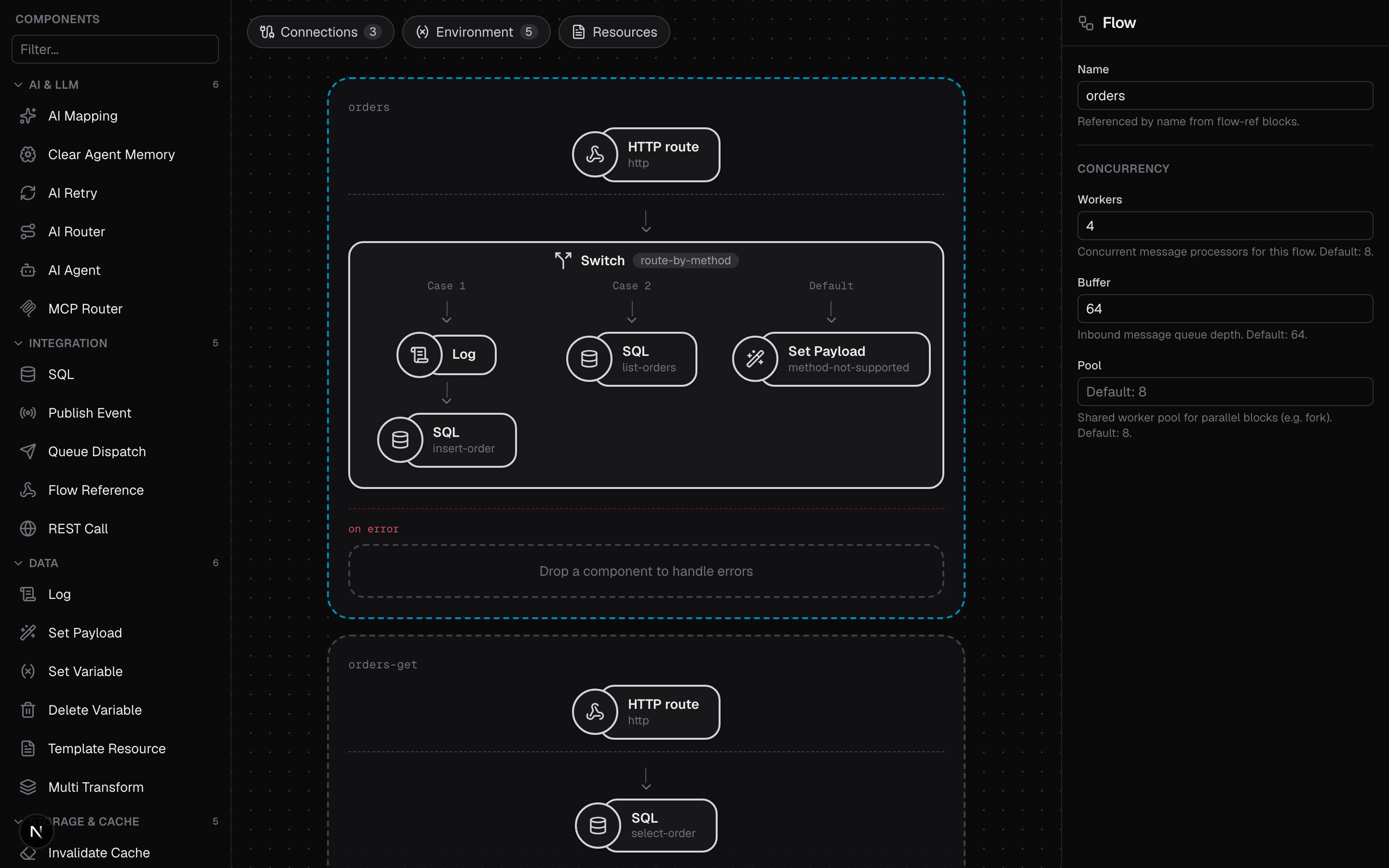
Create and list: route on the method
net/http registers one pattern per path, so a single flow serves /orders
and routes on vars.method with a switch: POST creates, GET lists.
The sql block takes a query with ? placeholders and an args list of CEL
expressions evaluated per message; values are bound as parameters, never spliced
into the SQL string. With single: true the body becomes the first row as a
JSON object (or null); without it, a JSON array of rows. RETURNING * on the
INSERT hands back the stored row, generated id included, in the same round trip.
flows:
  - name: orders
    workers: 4
    buffer: 64
    source:
      connector: api
      type: http
      settings:
        path: /orders
        correlationIdHeader: X-Request-Id
    process:
      - type: switch
        name: route-by-method
        cases:
          # POST: insert a row and return it (RETURNING *).
          - when: 'vars.method == "POST"'
            process:
              - type: sql
                name: insert-order
                settings:
                  connector: orders-db
                  query: "INSERT INTO orders (item, amount) VALUES (?, ?) RETURNING *"
                  args:
                    - body.item
                    - body.amount
                  single: true
          # GET: list every order (no `single`, so the body is a JSON array).
          - when: 'vars.method == "GET"'
            process:
              - type: sql
                name: list-orders
                settings:
                  connector: orders-db
                  query: "SELECT * FROM orders ORDER BY id"
        default:
          process:
            - type: set-payload
              name: method-not-supported
              settings:
                value: '{"error": "method " + vars.method + " not supported"}'
For statements with no rows to return (bulk UPDATE/DELETE, DDL), set
exec: true; the block skips the result set and the body becomes
{"rowsAffected": N}.
Read one: path parameter into args
GET /orders/{id} is a distinct pattern (because of {id}), so it lives in its
own flow. The path parameter arrives as vars.id and feeds the query as a bound
argument:
  - name: orders-get
    workers: 4
    buffer: 64
    source:
      connector: api
      type: http
      settings:
        path: /orders/{id}
        correlationIdHeader: X-Request-Id
    process:
      - type: sql
        name: select-order
        settings:
          connector: orders-db
          query: "SELECT * FROM orders WHERE id = ?"
          args:
            - vars.id
          single: true
Run it
task run:sample -- db-orders.yamlRead the seed row:
curl -s localhost:8080/api/v1/orders/1Create an order; the response is the stored row with its generated id:
curl -s -X POST localhost:8080/api/v1/orders \
-H 'X-Request-Id: req-1' -d '{"item":"widget","amount":1500}'{"id": 2, "item": "widget", "amount": 1500}List everything:
curl -s localhost:8080/api/v1/ordersPOSTs persist into the committed samples/orders.db fixture; reset it with
git checkout samples/orders.db.
Switch to Postgres
Override the env vars (inline or in a ./.env file):
DB_DRIVER=postgres
DB_DSN=postgres://user:pw@localhost:5432/orders?sslmode=disable
Bring one up with Docker and create the schema yourself:
docker run --rm -e POSTGRES_PASSWORD=pw -e POSTGRES_DB=orders -p 5432:5432 postgresCREATE TABLE orders (id SERIAL PRIMARY KEY, item TEXT NOT NULL, amount REAL NOT NULL);Postgres uses numbered placeholders, so swap ? in the queries for $1, $2,
and so on.
Where to go next
- Build a REST API: the HTTP side of this sample in depth.
- Validation and Auth: validate the POST body before it hits the database.
- Database connector reference: every connector and
sqlblock setting.