
Transforming Data
Reshape payloads with multi-transform, enrich scopes, and CEL.
Reshape message data four ways: chain ordered edits with multi-transform,
compute in isolation with enrich, branch and iterate with if, foreach and
switch, or do the whole job in one expression with the CEL extension
libraries. It follows
samples/multi-transform.yaml,
samples/enrich.yaml,
samples/builtins-demo.yaml,
and
samples/cel-extensions.yaml.
Every expression in this guide is CEL: it sees body (the
message payload), vars (the variables), plus eventID and correlationID.
Chain edits with multi-transform
multi-transform applies an ordered list of CEL edits in one block. Each step
either replaces the body (setBody) or sets a variable (setVar + value),
and the edits are additive: a later step reads what an earlier one produced,
so a whole chain of set-payload / set-variable blocks collapses into one.
flows:
  - name: order
    process:
      - type: multi-transform
        name: price-order
        settings:
          transforms:
            # 1) compute the subtotal on the body.
            - setBody: '{"orderId": body.orderId, "subtotal": body.qty * body.price}'
            # 2) stash it in a variable (reads the body step 1 produced).
            - setVar: subtotal
              value: body.subtotal
            # 3) add tax to the body (reads the subtotal variable step 2 set).
            - setBody: '{"orderId": body.orderId, "subtotal": vars.subtotal, "total": vars.subtotal * 1.1}'
      - type: log
        name: emit
        settings:
          logger: out
          message: '"order " + body.orderId + " subtotal=" + string(body.subtotal) + " total=" + string(body.total)'
The flow has no source, so call it directly with octo invoke:
bin/octo invoke --config samples/multi-transform.yaml --flow order \
  --data '{"orderId":"A-1","qty":3,"price":10.0}'
It logs order A-1 subtotal=30 total=33: step 3 read the variable step 2 set
from the body step 1 built.
Compute in isolation with enrich
enrich runs a body sub-flow on an isolated scope of the message, then
merges back only what you name. setBody rewrites the original body from the
scope's result and setVars pulls named values out. Everything else the scope
did (scratch variables, intermediate bodies) stays inside.
Here the scope replaces its body with a summary and sets a scratch variable, but
only the computed total escapes. setBody is omitted, so the original order body
survives untouched:
flows:
  - name: order
    process:
      - type: enrich
        name: derive-total
        # setBody omitted: the incoming order body is preserved.
        setVars:
          total: body.total # pull just the total out of the scope's summary
        body:
          process:
            - type: set-variable
              name: scratch
              settings:
                name: workingNote
                value: '"scope-only, never propagated"'
            - type: set-payload
              name: summary
              settings:
                # The scope rewrites the body on its clone; it stays isolated.
                value: '{"total": body.qty * body.price, "note": "scope-only body"}'
      - type: log
        name: emit
        settings:
          logger: out
          message: '"order " + body.orderId + " total=" + string(vars.total)'
bin/octo invoke --config samples/enrich.yaml --flow order \
--data '{"orderId":"A-1","qty":3,"price":10.0}'It logs order A-1 total=30 and returns the order body untouched, with total
among the printed message's variables. Use enrich when a computation needs
room without polluting the message, and multi-transform when the edits should
land directly.
Branch and iterate
The control-flow blocks compose with any transform.
samples/builtins-demo.yaml
tours them in one flow:
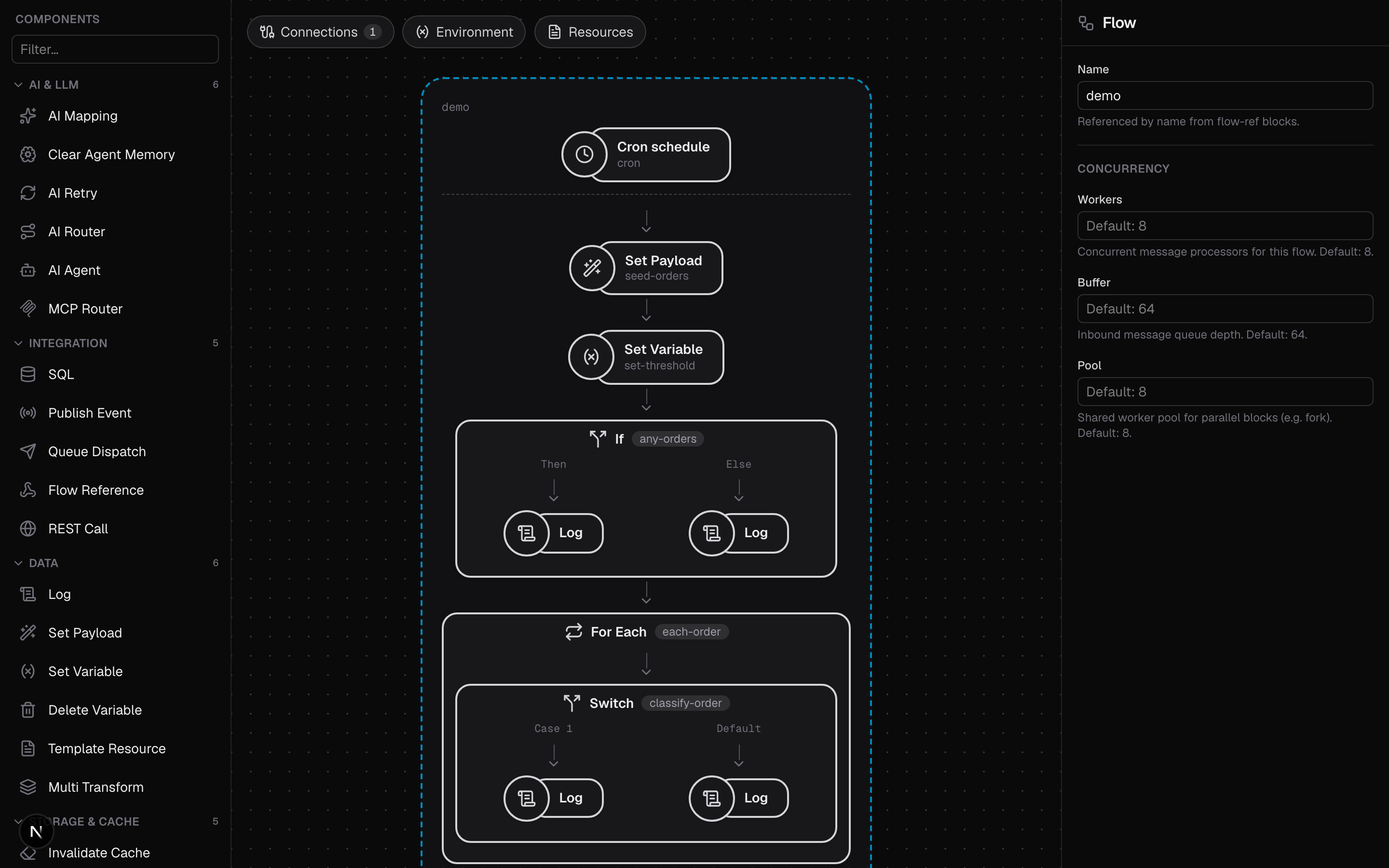
    process:
      # set-payload: replace the body with an object holding an orders array.
      - type: set-payload
        name: seed-orders
        settings:
          value: '{"firedAt": body.firedAt, "orders": [{"id": 1, "amount": 50}, {"id": 2, "amount": 250}]}'

      # set-variable: stash a threshold the switch below compares against.
      - type: set-variable
        name: set-threshold
        settings:
          name: threshold
          value: "100"

      # if/else: branch on whether there is anything to process.
      - type: if
        name: any-orders
        condition: "size(body.orders) > 0"
        then:
          process:
            - type: log
              settings:
                message: '"processing " + string(size(body.orders)) + " orders at " + body.firedAt'
        else:
          process:
            - type: log
              settings:
                message: '"no orders to process"'

      # foreach: iterate the array, binding each element to `order`.
      - type: foreach
        name: each-order
        items: "body.orders"
        as: order
        body:
          process:
            - type: switch
              name: classify-order
              cases:
                - when: "vars.order.amount >= vars.threshold"
                  process:
                    - type: log
                      settings:
                        message: '"HIGH order " + string(vars.order.id) + " amount=" + string(vars.order.amount)'
              default:
                process:
                  - type: log
                    settings:
                      message: '"low  order " + string(vars.order.id) + " amount=" + string(vars.order.amount)'

      # delete-variable: clean up the scratch variable.
      - type: delete-variable
        name: drop-threshold
        settings:
          name: threshold
if takes one condition and a then / else sub-flow. foreach evaluates
items to a list and runs its body once per element, binding each to the
variable named by as (here vars.order; the default name is item). switch
evaluates its when cases in order and runs the first match, or default.
Run it and watch each tick classify the two orders:
bin/octo run --config samples/builtins-demo.yamlSkip the loop with the extension libraries
Before adding a foreach, check whether one expression does it. Octo enables
cel-go's utility libraries in every expression field, so cleaning strings,
sorting, de-duplicating, indexing a list by a key and pulling a value out of free
text are one-liners.
samples/cel-extensions.yaml
normalizes a messy inbound order with no loop at all:
- type: multi-transform
  name: normalize-order
  settings:
    transforms:
      # Pull the id out of free text; a miss falls back instead of failing.
      - setVar: orderId
        value: 'regex.extract(body.reference, "ORDER-(\\d+)").orValue("unknown")'
      # Split, de-duplicate, and sort a comma-separated field.
      - setVar: roles
        value: 'body.customer.roles.split(",").distinct().sort()'
      # The largest line total. Prices are in integer cents, so it stays exact.
      - setVar: topLineCents
        value: 'math.greatest(body.lines.map(l, l.qty * l.unitPriceCents))'
      # Turn the line list into a sku -> qty lookup map.
      - setBody: '{"orderId": vars.orderId, "quantities": body.lines.transformMapEntry(i, l, {l.sku: l.qty})}'
bin/octo invoke --config samples/cel-extensions.yaml --flow normalize \
--data '{"reference":" ORDER-1042 / eu-west ","customer":{"email":"Ada.Lovelace@Example.COM","roles":"admin,billing,billing"},"lines":[{"sku":"b-2","qty":3,"unitPriceCents":1999},{"sku":"a-1","qty":1,"unitPriceCents":450}]}'
# -> logs "order 1042 (eu-west): 2 lines, top line 59.97, roles admin, billing"Prices are in integer cents because a JSON number is a binary double: a decimal price cannot be held exactly, and rounding it back into shape loses a cent on some values. See the warning under Math.
Extension Libraries has the full vocabulary (strings,
lists, encoders, math, two-variable comprehensions, sets, and regex) and what is
deliberately left out: there is no sum, so totalling a list still wants the
foreach above.
Convert between text formats
When a payload arrives as text (a YAML config, a .env file, a form body),
parse it with one expression instead of reaching for a block. Each format has a
parser and a renderer: fromJson/toJson, fromFormData/toFormData,
fromYaml/toYaml, and fromEnv/toEnv. Put the call in set-payload when the
result becomes the body, or in set-variable to keep the body and hold the
rendered text for a later block.
Parse on the way in, work with an ordinary body, and render on the way out.
samples/text-formats.yaml
reads a YAML service config and emits its deployment settings as .env content:
- type: set-payload
  name: parse-yaml
  settings:
    value: "fromYaml(body.yaml)"

- type: set-variable
  name: render-env
  settings:
    name: envFile
    value: 'toEnv({"SERVICE_NAME": body.name, "REPLICAS": body.replicas})'
bin/octo invoke --config samples/text-formats.yaml --flow render-config \
--data '{"yaml": "name: billing\nreplicas: 3\nenv:\n DB_HOST: db.internal\n DEBUG: false\n"}'Expect two things when you write against the parsed body. fromYaml normalizes
to the JSON-native shapes a body may hold, so a YAML integer arrives as a number
and a YAML timestamp as its RFC 3339 string. An env file carries no types, so
compare fromEnv values as strings with body.PORT == "8080", or convert them
with int(body.PORT). See
Octo Extensions for the full set.
CEL patterns worth stealing
# Default an optional field with a ternary + has():
value: 'has(vars.query.currency) ? vars.query.currency : "USD"'

# CEL is strongly typed: convert before concatenating.
message: '"total=" + string(body.total)'

# Guard a branch on collection size:
condition: 'size(body.orders) > 0'

# Reshape without a loop: sort, take the top three, keep just the names.
value: 'body.items.sortBy(i, i.amount).reverse().slice(0, 3).map(i, i.name)'
Where to go next
- Expressions: how CEL is wired through Octo.
- CEL reference: the language, macros, and Octo's extensions.
- Extension Libraries: strings, lists, math, sets, regex.
- Data blocks reference: set-payload, set-variable, multi-transform, enrich.
- Composing Flows: factor transforms into reusable flows.