
Standalone Editor
The visual flow editor: palette, canvas, settings, and console.
The standalone editor is a local, single-user visual editor for Octo flows. It
reads and writes plain *.yaml files in a directory on your disk, and runs them
with the bundled octo binary. No database, no account, no orchestrator.
It ships two ways, and they are the same editor. On macOS, install Octo Desktop and open a folder — the runtime and the test runner come with it. Everywhere else, run the published Docker image and mount the directory you want to edit:
docker run -p 3000:3000 -v "$PWD:/work" juancavallotti/octoOpen http://localhost:3000 and you are editing the YAML files in your current directory. See Running from Docker for the details, or the editor quickstart for a guided first run.
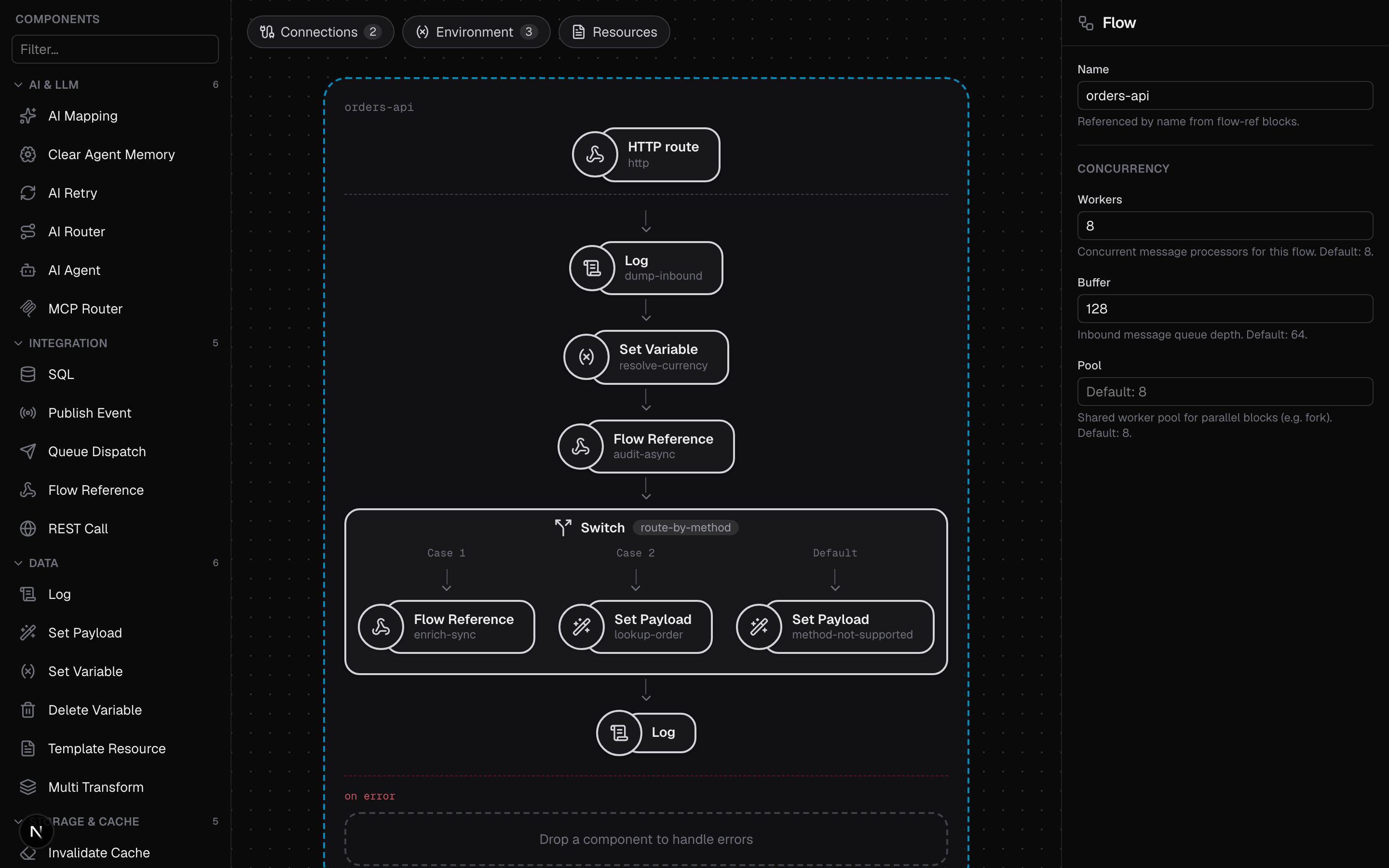
A tour of the UI
The editor is one screen: a header, the workspace, and a console docked at the bottom.
Header
The flow title is editable inline. The name becomes the *.yaml filename on the
first save, and renaming a saved flow renames the file on disk.
The open / new menu lists every YAML file in your mounted directory and opens one, or starts a blank flow. The store is flat: files live directly in the directory, with no folders.
The view toggle switches the workspace between the visual Canvas, a read-only YAML preview of the exact document that will be saved, a Resources view for the flow's env files and templates, and Testing, where a flow's dolphin test suite is written and run.
Save writes the YAML to your directory; Run starts the flow with the bundled runtime. See Running flows.
Palette
The left sidebar lists the flow blocks, grouped into collapsible sections with a filter box. Click or drag one to add it to the active flow.
Press Cmd/Ctrl + / to search the same list from anywhere without reaching for the sidebar: type part of a block's name or its runtime type, and Enter adds the first match. It lands in the flow the selected block is in, so a block selected inside a switch case or a fork branch adds to that branch.
The palette is not hardcoded: it is generated from the runtime's capability
schema (octo schema), so the editor always offers exactly what the bundled
octo binary can run. See How it works.
Canvas
The center canvas shows the integration: launchers along the top manage its connections, declared environment variables, and resources, and each flow is a board of source and block cards you reorder by drag and drop. Selecting a card opens it in the settings panel. Delete removes the selected card and Escape deselects.
Settings panel
The right panel edits the selected connection, source, or block. Its forms are also driven by the capability schema: each setting renders the right field for its declared type, including CEL expression fields with completion and an inline expression tester.
Completion knows where you are. A CEL field offers the variables that are
actually in scope at that point in the flow, worked out from the blocks above it: a
set-variable named userId upstream means vars. completes to userId in every
block after it, and a block that replaces the message body means the keys of the old
one stop being offered. Each suggestion says where it came from — set by
set-variable, seen in a test input — and one that only some branches set is marked
as not being on every path.
Bodies are harder than variables — the runtime types a body as dyn — so the editor
reads what you have already written down about them:
- Saved test inputs, which are what the flow is run with.
- Mocks, which say what a block returns. A mocked payment block whose body you wrote out completes downstream of itself, without ever calling the real API.
- Test suites, which are the richest source: their shared inputs, each case's input, what a case expects the flow to answer, the mocks they stand blocks in with, and the messages a spy expectation names.
All of that is authored rather than captured, so it costs no run and it is committed beside the flows — a fresh checkout has it.
Running your tests teaches it the rest. Every suite run from the Testing tab is
traced, and the message entering and leaving each block is recorded as a shape —
its field names and their types. That is how body. learns what a REST call or an
LLM actually answers, which nothing in the document could have said. The suite's own
mocks mean nothing real is called, so this costs one test run you were going to make
anyway.
Only names and types are kept, never a value: the shapes are reduced on the server
and the trace they came from is discarded there. Keys that look like data rather than
field names — an object keyed by email address or id — collapse to "a map", because
that is the one place where keeping "only the keys" would still keep the data. What
is stored lands in .octo/editor-meta.json; the eraser beside a suite forgets it, and
running the tests again learns it back.
The editor never suggests a name it cannot justify from one of these sources: an empty menu means it does not know, which is more useful than a guess.
Console
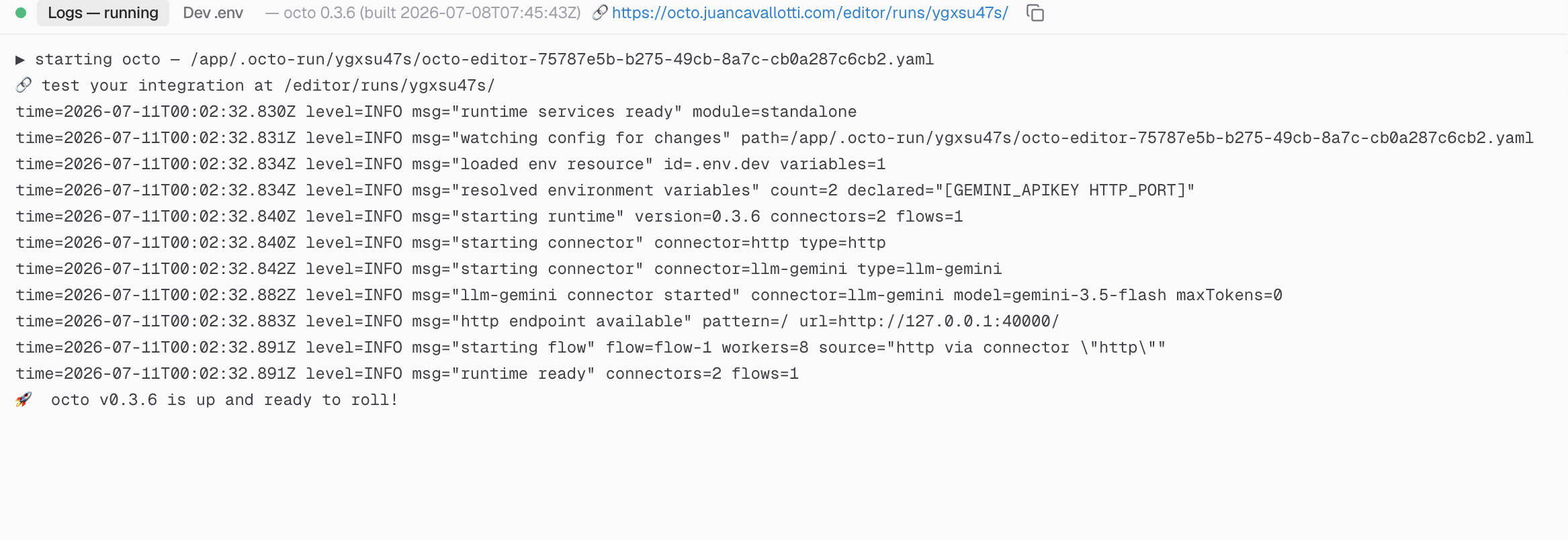
The bottom panel docks a tabbed console. Logs streams the output of a running flow live, Problems and Output report what a single-flow run made of it, Tests shows the last test run's verdict, and Dev .env edits local-only values for the flow's declared environment variables. It expands automatically when a run starts and can be resized or collapsed.
Keyboard
| Cmd/Ctrl + Enter | Run — the integration, or the suites on the Testing tab |
| Cmd/Ctrl + Shift + Enter | Run the current flow once |
| Cmd/Ctrl + . | Stop |
| Cmd/Ctrl + / | Add a component |
| Cmd/Ctrl + Z | Undo |
| Cmd/Ctrl + Shift + Z | Redo |
| Cmd/Ctrl + S | Save |
| Delete | Remove the selected card |
| Escape | Deselect |
| Cmd/Ctrl + = / - / 0 | Zoom in, out, reset |
| ! | Zoom to fit |
Cmd/Ctrl + Enter runs whatever the view is about, which is the same rule the RUN button follows: the integration on the canvas, every suite on the Testing tab. It never stops a run — a key labelled run that halts things is a surprise — so Cmd/Ctrl + . is the one that means stop.
It runs with the caret anywhere, including in a setting you were just editing, since that is where the caret usually is when you want to run. The CEL tab is the one exception: there Cmd/Ctrl + Enter evaluates the expression, and only that.
Undo covers everything that changes the document — blocks, settings, connections, environment variables and resources — and not the view or the selection, so one press takes back one edit. Typing in a field is a single step rather than one per keystroke. Inside a text field the browser's own undo applies; step out of the field and Cmd/Ctrl + Z takes back the whole edit.
Who it's for
Use the standalone editor to try Octo and to develop flows locally: your flows
are ordinary files you can run with the CLI, commit to git,
and iterate on with hot reload. The Docker image also exposes an MCP server at
/mcp, so an AI assistant can author and run flows against the same directory.
See MCP authoring.
When you need multiple users, deployments, secrets management, and persistence beyond local disk, move to the platform. It embeds the same editor, backed by the orchestrator instead of your filesystem, so flows built standalone carry over as-is.
The standalone editor is single-user by design: there is no authentication, and anyone who can reach port 3000 can read and write the mounted directory. Keep it on localhost or a trusted network.