
Integrations
Authoring, organizing, and managing integrations on the platform.
On the platform, an integration is a named project stored in Postgres: a display name plus the files it is made of — its flow files and the resources beside them. This page covers the integration record itself: its lifecycle, naming, attribution, and folder organization. Versioning is covered in Snapshots and running in Deployments.
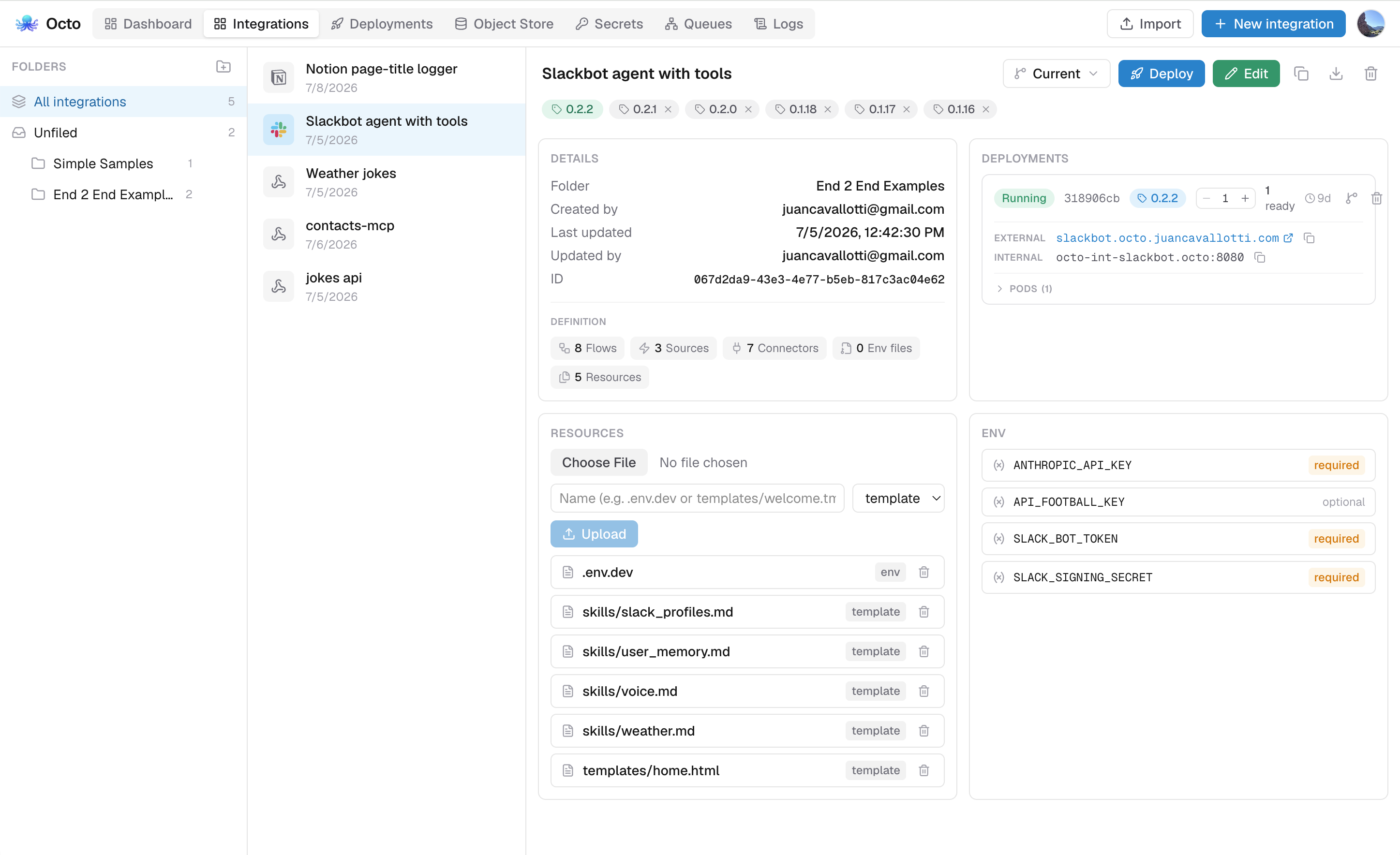
The integration record
Each integration row carries a handful of things.
id is a UUID, the durable handle everything else (folders, snapshots, resources, deployments) references.
name is required, at most 200 characters, and unique case-insensitively across the platform. Renaming to a taken name is rejected with a conflict error. The name also seeds the deployment slug used for internal URLs and default subdomains.
definition is the integration's runtime YAML as the API reports it. It is not a stored field: it is the integration's flow files merged, on the same terms the runtime merges a directory — flow, connector and processor names must be unique across them, and service: may be declared in only one. An integration with a single flow file — which is how every integration starts, and what the editor's load-and-save round trip assumes — gets that file back byte for byte. Once an integration has several, reads still return the merge, but a whole-definition write is rejected as ambiguous (below).
Files are stored one row each, and what a file is follows from its path, exactly as it does when --config points at a folder:
| Path | Role |
|---|---|
a root-level *_test.yaml / *_test.yml | a dolphin suite |
any other root-level *.yaml / *.yml | a flow file, merged into the definition |
| anything else — nested paths, dotfiles | a resource |
A whole-definition write to an integration that has more than one flow file is rejected, because there is no way to say which file it replaces. Today only a bundle import can produce one.
icon is an intentionally chosen icon, by name. It is empty by default, and empty means the list derives one from the definition's trigger types — a Slack connector shows Slack, a cron source shows a clock. Choose one from the icon button beside the integration's name; picking Suggested clears the choice and hands the icon back to the derivation, so an integration whose trigger changes later follows it again.
It has its own endpoint, PUT /integrations/{id}/icon, rather than being a field on the integration payload: every other write sends a whole integration, and a field there would have an unrelated save clear the choice.
Attribution is createdBy/updatedBy, recording which user authored and last edited the integration, resolved to email/name for display. Both are optional: a write through a path with no known actor leaves them unset, and deleting a user leaves their integrations in place (attribution is nulled, never cascaded). Every file carries the same pair, so "who changed this" can be answered per file and not only per integration.
Lifecycle
The working copy is fully mutable (create, edit, rename, delete) through the editor or the MCP endpoint. The underlying REST surface on the orchestrator:
| Operation | Endpoint |
|---|---|
| Create | POST /integrations |
| List | GET /integrations |
| Read | GET /integrations/{id} |
| Update (name and/or definition) | PUT /integrations/{id} |
| Delete | DELETE /integrations/{id} |
The browser never calls these directly; the platform app's authenticated BFF proxies every call and forwards the acting user's id so edits are attributed.
Deleting an integration cascades: its folder membership, snapshots (and their frozen resources), live resources, and deployment records go with it.
Editing the working copy never changes what is running. Deployments ship an immutable version tag; to run new edits you create a tag and deploy or roll it out.
Bundles
A bundle is an integration as one portable file: a zip carrying its definition and every resource it owns. It is how an integration leaves the platform and comes back (a backup, a hand-off, or a move between installs) without exporting the definition and each resource one at a time.
| Operation | Endpoint |
|---|---|
| Download the working copy | GET /integrations/{id}/bundle |
| Download a version tag | GET /snapshots/{id}/bundle |
| Import as a new integration | POST /integrations/bundle |
| Replace an integration's contents | PUT /integrations/{id}/bundle |
Both uploads take the zip as the raw request body (Content-Type: application/zip) and answer with the created or updated integration.
In the integrations manager
The detail pane's Download menu offers the active version either way: Definition for the YAML on its own, Bundle for the zip. Switch versions with the picker beside it and the menu follows. A tag downloads its frozen contents; Current downloads the working copy.
Import in the top-right toolbar takes either shape, a .yaml definition or a .zip bundle, both creating a new integration. Replace from bundle, the upload button next to the Download menu, overwrites the selected integration's contents instead. It accepts a .zip only, appears only on the working copy (a tag is immutable), and confirms first because it deletes resources the bundle does not carry.
Individual resources download from the Resources panel, frozen ones included.
What is in the archive
The layout is the one the runtime already expects on disk, so unzipping a bundle produces a directory a local octo can run:
order-sync.yaml           # the definition, named after the integration
.env.dev                  # each resource at its own path-like name
templates/welcome.tmpl
octo-bundle.json          # the manifest
octo-bundle.json carries what the file layout cannot: the integration's display name, the tag an export was taken from, which entry is the definition, and each resource's kind.
{
  "version": 1,
  "name": "Order Sync",
  "definition": "order-sync.yaml",
  "resources": [
    { "name": ".env.dev", "kind": "env" },
    { "name": "templates/welcome.tmpl", "kind": "template" }
  ]
}
octo-bundle.json is reserved: a resource named exactly that cannot be exported, and an archive carrying the same entry name twice is refused.
A hand-made zip without a manifest still imports. The single .yaml at the archive root is taken as the definition, every other file becomes a resource, and its kind follows the filename convention (.env* is env, anything else is template). Zero or several root-level YAML files is ambiguous and is rejected. Pass ?name= on the import to name an integration the archive does not name.
Import and replace
Import (POST) always creates a new integration. It takes the name from the manifest, falling back to the name query parameter; a name already in use is suffixed (Order Sync (2)) rather than rejected, since importing a copy of something already here is the normal case. If a resource fails to store, the whole import is rolled back, because a half-imported integration looks complete and is not.
Replace (PUT) overwrites the addressed integration's definition and resource set while keeping its identity: its id, name, folder, version tags and deployments all stay. Resources are reconciled by name: shared names are updated in place, new ones added, and any the bundle no longer carries are deleted. The bundle's own name is ignored, since a replace is not a rename.
Replacing is destructive to the working copy: resources the bundle does not carry are deleted. Existing version tags are untouched, so anything already deployed keeps running its frozen copy.
Entry names are validated on the way in and out (absolute paths, .. segments and backslashes are refused), and both the upload and what it decompresses to are size-bounded.
Folders
Integrations are organized in a folder tree. Folders nest arbitrarily (each folder has an optional parent), and an integration lives in at most one folder, so adding it to another folder moves it. Both folders among their siblings and integrations within a folder keep a manual order: new entries are appended, and reorder operations persist the position.
The folder API mirrors the integration API:
| Operation | Endpoint |
|---|---|
| Create / list / read / rename / delete folders | POST/GET /folders, GET/PUT/DELETE /folders/{id} |
| Reorder sibling folders | PUT /folders/reorder |
| List a folder's integrations | GET /folders/{id}/integrations |
| Add (move) an integration into a folder | PUT /folders/{id}/integrations/{integrationId} |
| Remove an integration from its folder | DELETE /folders/{id}/integrations/{integrationId} |
| Reorder integrations within a folder | PUT /folders/{id}/integration-order |
Deleting a folder cascades to its subfolders. Integrations themselves are not deleted; memberships are.
Authoring surfaces
Three clients write to the same store:
- The visual editor, the primary authoring surface, with validation, the RUN feature for testing, and deployment management.
- The MCP endpoint (
/mcp), where AI agents create and update integrations programmatically. A write publishes a live-reload event so an editor with that integration open refreshes. See The Platform MCP Server. - The orchestrator API, for any authenticated automation the BFF fronts.