
Deployments
Deploying integrations as Kubernetes workloads: rollouts and rollbacks.
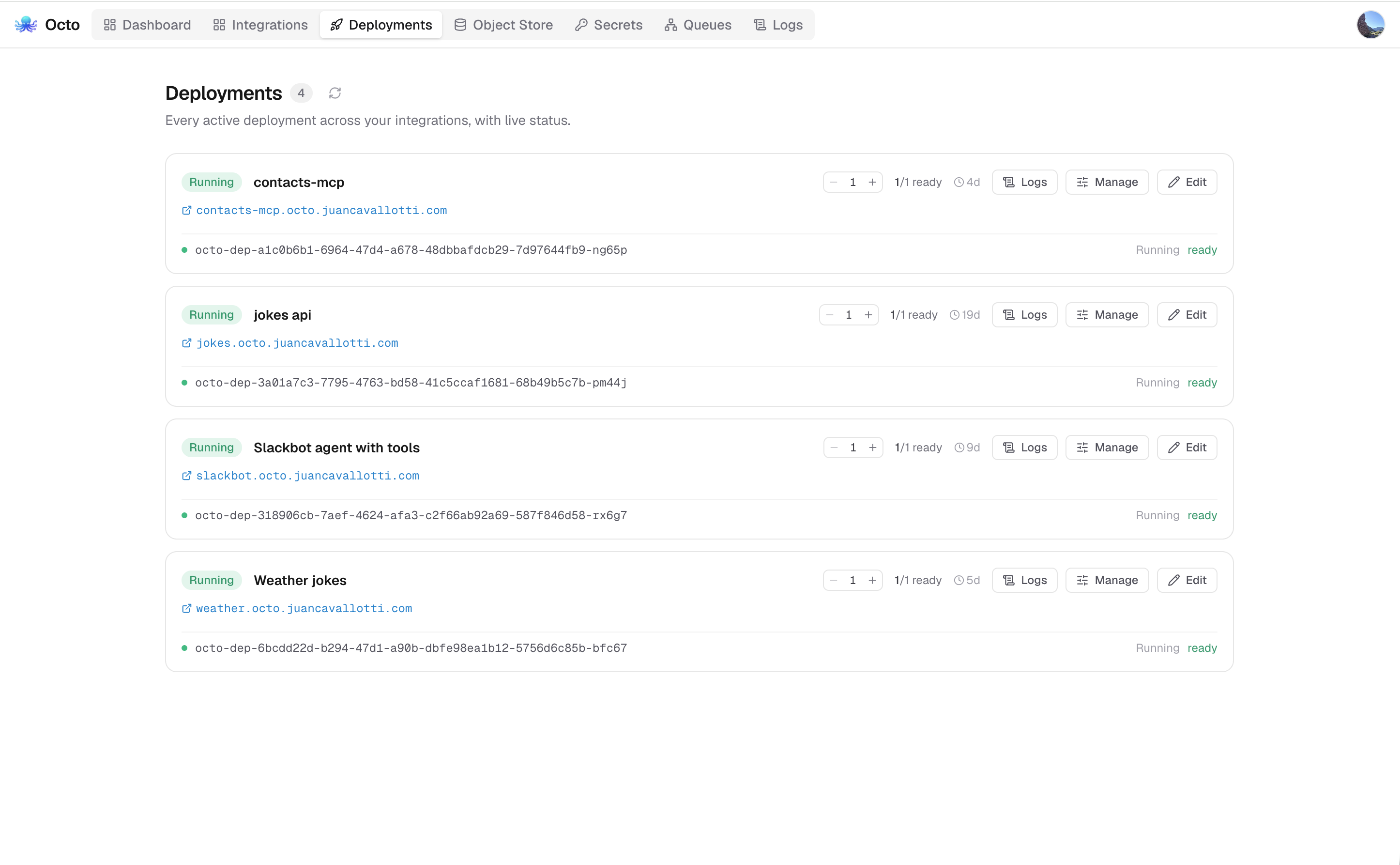
Deploying an integration runs a version tag of it as its own Kubernetes workload: a Deployment of the generic octo-runtime image with the tag's frozen definition mounted in. One integration can be deployed many times (say, a staging and a production deployment on different tags), and each deployment has its own address, scale, and environment bindings.
What a deploy creates
For each deployment the orchestrator creates resources named octo-dep-{deploymentId} in its namespace, labelled with the deployment and integration ids:
- A ConfigMap holding the frozen definition as
integration.yaml, mounted read-only at/etc/octo/integrations, the runtime image's default config directory. - A Deployment running
octo-runtimeat the requested replica count (minimum 1). The orchestrator injects the runtime-services environment (RUNTIME_SERVICES_MODULE=k8s,OCTO_DEPLOYMENT_ID,ORCHESTRATOR_URL,NATS_URL, the pod's name/namespace via the downward API, and the deployment's display name, tag, and snapshot id) plus your env bindings, andOCTO_TRACINGwhen the deployment is traced. - Services, only for networked integrations (see below): a per-deployment ClusterIP Service, and a stable internal Service
octo-int-{slug}other integrations address. - An Ingress, only when the deployment is exposed externally.
A failed deploy is rolled back completely: partial cluster resources and the database row are removed.
Networked vs. bare workloads
An integration that declares HTTP_PORT (with a numeric default) in its env block has an HTTP source listening on that port. Only those deployments are networked: they get Services, a unique slug, an internal URL, and the option of external exposure. The orchestrator supplies HTTP_PORT (and HTTP_HOST=0.0.0.0, when declared) into the pod, so the listener binds all interfaces; these two variables are managed and cannot be overridden by bindings.
Anything else (a cron-driven job, a queue consumer) runs as a bare workload: pods only, no Service, no URL.
Internal address
Every networked deployment gets a slug, unique across all deployments: pick one in the deploy dialog or leave it empty to have the orchestrator allocate one from the integration name (orders, orders-001, ...). The slug names the stable internal Service, so other integrations reach the deployment at a constant, replica-balanced address reported as the deployment's internalUrl:
http://octo-int-{slug}.{namespace}:{port}External exposure
Toggling external exposure additionally creates an Ingress at https://{subdomain}.{baseDomain}; the subdomain defaults to the slug and must be unique across integrations. Which controller serves it is the chart's orchestrator.ingressClass; empty (the default) leaves it to whichever IngressClass the cluster marks default. TLS is whatever that domain is set up for: a per-host certificate issued by the configured ClusterIssuer over HTTP-01, a shared pre-issued wildcard when the chart's wildcardTLS is enabled, or none of the chart's doing when something upstream terminates. The public address is reported as externalUrl.
External endpoints require BASE_DOMAIN on the orchestrator (the Helm chart's orchestrator.baseDomain); without it an external deploy is rejected. See Deploying with Helm.
Environment bindings
The deploy dialog lists every env var the tag's definition declares. Each can be bound to a literal value or a cluster secret by name (injected via secretKeyRef, so the value never touches the database). Keys already supplied by the tag's frozen .env resources count as provided. A deploy that leaves a required variable unbound by either is rejected up front instead of letting the pod crash-loop. Full details: Resources and Secrets.
Tracing
Trace this deployment in the deploy and rollout dialogs runs its pods with the runtime's tracer on, recording the flows and blocks each message passes through and every model call made on its behalf, priced with what it cost, for the platform to store and query. See Traces.
Tracing is a troubleshooting tool, not a production setting. It significantly reduces throughput: every traced block is recorded on the flow's own goroutine, and capturing payloads marshals the message once per block. Turn it on for the deployment you are debugging, and turn it off again once you have your answer.
It is a per-deployment setting, off by default, so a staging deployment can be traced while the production deployment of the same integration is not. Deployments that have it on are marked Traced in the deployment lists.
The runtime resolves OCTO_TRACING when it parses its flags, before any config is loaded, so the setting only reaches a pod that starts with it. Changing it on a live deployment goes through a rollout, which replaces the pods. A rollout that does not mention tracing leaves the setting as it was, so a plain version bump never stops a trace you are reading.
Captured bodies and variables are stored as they arrived and are readable by anyone signed in to the platform. Avoid tracing a deployment whose messages carry credentials, or set OCTO_TRACING_BODIES=false as an env binding to record the sequence without payloads.
Platform access
Every deployed integration presents a platform token of its own, and what it may do is what that token carries. Every one of them reaches the stores its pod owns — its key-value namespace, its objects, its agent memory. The deploy and rollout dialogs carry two independent grants under Advanced, both off by default, saying what it reaches besides.
| Grant | What the token additionally opens |
|---|---|
| Builds integrations | Integrations, their resources, versions and dev runs — across the whole installation, not just its own |
| Operates deployments | Deploying, rolling out, scaling and removing deployments — anyone else's included |
Two checkboxes and not a choice: building integrations and operating them are different jobs, and one integration can do both, either, or neither.
Neither grant is scoped to the deployment's own integration. Builds integrations reads and writes every integration here, and Operates deployments acts on every deployment. Grant either only to an integration you would trust with the corresponding role on your own account.
The token an unattended flow uses
This matters most where there is nobody to borrow a credential from. A flow woken by a queue message, a webhook or a Slack event has no person behind it and never will — so the deployment's own token is not a fallback, it is the only credential that flow has.
It is available to the flow as env.PLATFORM_TOKEN, and the runtime keeps it valid. You do not have to obtain it, refresh it, or notice when it changes:
connectors:
  - name: octo
    type: http-client
    settings:
      baseURL: ${ORCHESTRATOR_URL}
- type: rest
settings:
connector: octo
method: GET
path: /integrations
headers:
Authorization: '"Bearer " + env.PLATFORM_TOKEN'Two things to know about how you reference it:
- Read it through an expression, as
env.PLATFORM_TOKEN. That is what gets you the token that is valid now. - Not as
${PLATFORM_TOKEN}. That spelling is substituted once when the definition is loaded, so it would freeze whatever was valid at startup — and start failing an hour later, silently.
On a runtime that has no platform identity — the editor's Run, dolphin, a local octo run — the variable is an ordinary environment variable and is simply unset unless you set it, so the same definition loads and tests everywhere.
Who may grant it. The token is minted on the authority of whoever is deploying, and iam refuses to lend a deployment more than that person could do themselves. It never inherits: an administrator's deployment is not an administrator, and the grants are what somebody ticked on purpose.
Renewal keeps what was granted. A deployment's token is renewed as what it was minted as, not as what its owner may do now. Taking somebody's operator role away does not quietly change what their running integrations reach — stopping one is what deleting the deployment is for.
Addresses are not access. ORCHESTRATOR_URL and OBSERVABILITY_URL are in every runtime pod. Neither is a boundary: both APIs authorize the token they are presented, and anything on the cluster network could dial either address regardless.
Shared responsibility
Octo's side. The token exists, is scoped to the grants above and nothing more, is renewable however long ago it expired, and is kept valid without your flow doing anything. It is mounted rather than passed in the pod's spec, and it is never written into a log line.
Your side. What the flow does with it. env.PLATFORM_TOKEN is a string like any other once your definition has it, and a flow can put a string anywhere:
- Do not copy it into a message variable. A traced deployment records variables, and traces are readable by anyone signed in to this platform. A token in a variable is a token handed to everybody with an account.
- Do not send it anywhere but this installation. It is a bearer credential: whoever holds it is your deployment, with its grants, until it expires.
- Do not log it, including by logging a whole message that carries it.
- Treat the grants as the blast radius of your definition. An integration with Operates deployments that can be made to act on attacker-chosen input can remove somebody else's deployment. Narrow what the flow will act on, not just what it can reach.
Access is stored on the deployment and, like tracing, is carried through a rollout that does not mention it.
Runners
A runner is which image a deployment's pods run. There are two, and the choice is per deployment.
| Runner | Image | For |
|---|---|---|
standard (the default) | octo-runtime: distroless, one static binary, no shell, nothing writable | Every integration that serves requests, consumes a queue, or runs on a schedule |
agentic | octo-agenticrunner: adds a shell, curl, jq, the standalone octo CLI, dolphin, and a writable /workspace | An integration built to drive the platform: one whose flows run local commands, invoke other flows, or execute a test suite |
A cli-run block in an image with no local programs cannot run anything, and a file connector needs somewhere writable to point at; the platform agent is the first deployment to need both. The agentic runner gets a /workspace volume, an emptyDir capped by the chart that dies with the pod, and whatever CPU and memory limits the chart sets for it. Nothing else about the workload changes: same probes, same ConfigMap, same Services, same rollout.
The agentic runner is privileged, not merely bigger. A pod holding a shell and a runtime it can point at a definition it wrote a moment ago is a general execution environment, so the boundary is the pod, not any allow list inside the flow. Everything that pod holds, including secrets bound to its environment, and everything it can reach on the network, is reachable by anything it runs. Grant it to integrations whose definitions you control.
An installation whose chart does not configure the agentic image does not have that runner, and a deploy asking for it is refused with the setting named rather than quietly downgraded: the standard image would produce a healthy pod whose every command fails with not found. Like the grants above, the runner is stored on the deployment and carried through a rollout that does not mention it.
Status
Deployment status is computed live from the cluster through Kubernetes informers, so reads are cheap and updates are push-based. pending means created, pods not ready yet; running means at least one replica is ready; failed means a pod is in a terminal or crash-looping state, and the response carries the reason (an image or secret problem, say) and per-pod detail.
Each status change is published to NATS and streamed to the browser as SSE (see Event Bus), with a polling fallback when no broker is configured. Individual pod logs stream from GET /deployments/{id}/pods/{pod}/logs (with follow/tail); aggregated, searchable logs across deployments live in the logs view, see Monitoring.
When the cluster and the database disagree
A deployment is a row in integration_deployments and a set of Kubernetes objects named from that row's id. A cluster that went away and came back leaves rows describing workloads it has never had, and since status falls back to the cached value whenever the cluster read fails, those rows keep saying running. A deploy whose rollback failed leaves the opposite: a Deployment with no row.
A sweep runs once at startup and every five minutes after that, and repairs both:
| Found | Done |
|---|---|
| A row whose workload is gone | The row is deleted, along with the internal Service and the deployment's KV entries, the same cleanup Undeploy does. |
| A workload with no row | The workload is deleted. |
| A stored platform-agent id pointing at a deleted row | The id is forgotten, so the admin page offers Deploy rather than a roll-out of nothing. |
A cluster_secrets entry with no key in the cluster | The catalogue entry is dropped. |
Three things it will not do. A key in the cluster's Secret with no catalogue entry is logged and kept, because a catalogue restored from an older backup is exactly when the key is worth saving. A row touched in the last five minutes is left alone, because a deploy writes its row before it calls the API server. And no row is deleted on the strength of the listing alone: the sweep asks again for that one workload by name first, because the listing matches on labels, which anyone with cluster access can edit. The secret sweep also does nothing while the shared octo-secrets Secret does not exist, since it is created by the first secret you store and is briefly absent while an externally managed Secret is recreated.
The sweep deletes rows, so it never guesses. If the cluster cannot be listed (an error, or informer caches that have not loaded) it does nothing at all, because "I could not see the cluster" and "the cluster is empty" are the same empty answer. An orchestrator with no cluster access never sweeps.
Deleting a row is not recoverable: its settings and env bindings go with it. Redeploy from the integration's version list, which still has the tag.
Day-2 operations
| Operation | Endpoint | What it does |
|---|---|---|
| Scale | PATCH /deployments/{id} | Changes the replica count in place; the Service keeps balancing across the new set. |
| Roll out a new version | POST /deployments/{id}/rollout | Upgrades the deployment to a different tag in place. |
| Undeploy | DELETE /deployments/{id} | Removes the cluster resources and the record. |
Rolling out a new version
A rollout ships a different tag's frozen definition to a live deployment as a rolling update: the orchestrator rewrites the ConfigMap, stamps a config-hash annotation on the pod template so Kubernetes rolls the pods, and records the new tag. The deployment keeps its identity (id, slug, internal and external URLs, replica count) and its env bindings and tracing setting; pass a replacement binding set, or a tracing flag, to change either during the rollout. Because the same mechanism accepts an older tag, rollback is a rollout to the previous tag.
Two guards apply, mirroring deploy: the target tag's required env vars must still be provided, and a tag that changes whether the integration is networked (adds or removes HTTP_PORT) is rejected, because that would change the Service/Ingress topology, which a rolling update cannot express. Undeploy and redeploy instead.
The new tag, env bindings and tracing setting are recorded in one write once the pods have rolled. If that write fails, the rollout reports the failure even though the pods did roll: they are on the new version and the stored record is behind them until a retry succeeds. Retrying is safe, because a rollout is idempotent, and an omitted env or tracing value on the next rollout is read from that record.
Deploying "Current" from the editor first creates a tag of the working copy, then deploys that tag, so even ad-hoc deploys are pinned to an immutable version.
Undeploying
Undeploy deletes the Ingress, Deployment, Services, and ConfigMap, then the deployment record. The deployment's entries in the KV store are cleaned up best-effort; a cleanup failure never blocks the undeploy, and orphaned rows are harmless.