
Users and API Keys
Authentication, user management, and API tokens.
The platform authenticates people with OIDC single sign-on and machines with per-user bearer tokens. This page covers sessions, user provisioning, roles, and how API keys are minted and verified.
Sign-in (OIDC SSO)
Authentication lives entirely in the platform app, built on Auth.js (NextAuth), with one OIDC provider using the authorization-code flow. Octo ships no identity provider and privileges none: bring any standards-compliant one, such as Auth0, Keycloak, Okta, Entra ID, Google, Authentik, or Dex. The issuer, client id, and client secret come from OIDC_ISSUER, OIDC_CLIENT_ID, and OIDC_CLIENT_SECRET (set by the Helm chart's auth.oidc values).
Sessions are JWTs with no database adapter. The session rides in a signed cookie (AUTH_SECRET), so the same config backs both route handlers and the edge request gate.
Single sign-on is not optional and there is no unauthenticated mode — local development included. An install missing any of OIDC_ISSUER, OIDC_CLIENT_ID, OIDC_CLIENT_SECRET or AUTH_SECRET is one nobody can sign in to, and the welcome page names the ones that are missing rather than offering a button that would fail at the provider. The Helm chart refuses to render without them.
Configuration
| Variable | Required | Default | Purpose |
|---|---|---|---|
OIDC_ISSUER | yes | none | Issuer URL; its .well-known/openid-configuration supplies every endpoint |
OIDC_CLIENT_ID | yes | none | Client id (not a secret; it travels in the redirect) |
OIDC_CLIENT_SECRET | yes | none | Client secret |
OIDC_PROVIDER_NAME | no | OIDC | Name on the sign-in button: "Sign in with …" |
OIDC_PROVIDER_LOGO | no | the issuer's favicon | Mark on that button; renders without one if it 404s |
OIDC_SCOPES | no | openid profile email | Space-separated scopes requested at sign-in |
OIDC_AUTHORIZATION_URL | no | discovery | Endpoint override |
OIDC_TOKEN_URL | no | discovery | Endpoint override |
OIDC_USERINFO_URL | no | discovery | Endpoint override; also used by /mcp |
OIDC_JWKS_URL | no | discovery | Endpoint override; also used by /mcp |
The endpoint overrides exist for providers whose discovery document is unreachable, incomplete, or wrong. Against a compliant provider, leave all four empty: discovery keeps working when the provider moves an endpoint.
Register {AUTH_URL}/api/auth/callback/oidc as a redirect URI on the provider. The oidc in that path is the Auth.js provider id and is fixed, whatever you call the provider in OIDC_PROVIDER_NAME.
What your provider must support
Editor sign-in asks little: the authorization-code flow, a discovery document (or the four endpoint overrides), and that redirect URI. The MCP endpoint asks for more, so check before you settle on a provider.
MCP needs Dynamic Client Registration. MCP clients (Claude Code, Codex, and the rest) read the platform's /.well-known/oauth-protected-resource/mcp document, follow it to your authorization server, and register themselves via RFC 7591. Without DCR there is no "just connect": every user has to hand-register a client with your IdP and paste a client id and secret into their harness's MCP config. Several providers ship DCR disabled, or gate it behind a plan tier, so check yours before committing.
Beyond DCR, /mcp requires three things of the provider:
- Resource indicators (RFC 8707) must be honoured: the access token's
audmust equal the MCP resource identifier ({AUTH_URL}/mcp, orMCP_RESOURCE_URL). A provider that ignores theresourceparameter and mints tokens for its own default audience fails verification with a token that otherwise looks fine. - Access tokens must be RS256-signed JWTs with a reachable JWKS. Opaque access tokens are not supported; there is no introspection path.
- A userinfo endpoint must be exposed. Email and name are read from it to provision the user row on first call.
Where DCR is unavailable, an MCP client cannot reach /mcp at all: it verifies access tokens the provider minted and nothing else.
The app-wide request gate redirects unauthenticated browser navigations to sign-in and answers unauthenticated /api/* calls with 401. /mcp is the one application endpoint that bypasses it, because it authenticates itself with bearer tokens (below); the welcome page, /api/auth* and two static images are exempt too. A running integration is a pod with a hostname of its own, so a webhook callback never reaches the platform app to be redirected in the first place.
Who may sign in
This platform is an allowlist. Being able to authenticate at your identity provider is not by itself permission to be here: an account has to exist before its owner can sign in, and an administrator creates it. The provider says who somebody is; the platform says who may come in. An installation whose provider admits an entire company should not admit an entire company.
The exception is the very first sign-in on a fresh installation, because there is nobody to have created that account. That person is granted platform:admin so that somebody can administer it. The rule is keyed on there being no administrator rather than on there being no users, which is the same thing on a new install and the more useful thing on one that has somehow lost its administrators.
Accounts are managed under Admin → People. Adding somebody asks for their email address and, optionally, their name. That is all, because that is all you know about a colleague who has never been here — and until they arrive their row shows Never where a last sign-in would be.
Two keys, and the difference between them matters. The address is what you provision by, and it is what decides who somebody is exactly once: the first time a person authenticates with it, their OIDC sub is written onto that waiting row. From then on the subject is what every sign-in keys on, so a changed address at the provider is a refresh of an existing account rather than a new person. Nobody ever types a subject.
One rule follows from that, and it is a refusal: somebody authenticating with an address that belongs to a row another principal has already claimed is refused. That is a different person wearing a familiar address, not the one the row was waiting for.
Addresses are unique case-insensitively, since providers treat them that way.
An address is worth what your identity provider makes it worth. Octo takes the address the provider vouches for and reads no further claim — so a provider that lets anybody self-register an address is a provider that lets anybody take the account waiting for one, including an administrator's. Point this platform at a tenant that owns its address namespace.
A users row carries a durable id, which is what integration attribution and API keys reference; deleting a user takes their API keys and role grants with them but leaves what they authored, with the attribution cleared.
The directory is paged and filtered by iam rather than by the browser — by a substring of the name or address, and by role. Each row shows the subject their provider presents, or Not signed in yet: that is the answer to "why can this person not get in", and it is the first thing to look at when somebody says they cannot.
Roles are changed in a dialog, never in the table. Adding somebody takes their address, their name and their roles together — they are granted with the row, so nobody exists here holding something nobody chose. Changing what an existing person may do means opening Edit, ticking, and saving. A role chip in a list somebody is scrolling is how platform:admin gets handed out by accident, which is the whole reason the table's pills are a reading and not a control.
An administrator cannot change their own roles or remove themselves from this screen, and iam refuses to remove the last administrator however the request arrives. Removing somebody asks first: their API keys and role grants go with them.
Roles
Roles are rows in this platform's own database, owned by the iam service, not claims the identity provider chose to send. There are four:
| Role | For |
|---|---|
platform:admin | Administering the installation: its settings, its users, its agent. |
platform:operator | Running things — deployments, and the state behind them. |
platform:developer | Building things — integrations, resources, dev runs. |
platform:monitor | Looking, and nothing else. |
Sign-in exchanges the provider's token for one this platform signed, carrying the caller's user id and their roles. That token is renewed while the session runs, and the renewal re-reads the roles — so a grant or a revocation takes effect within a token lifetime (an hour by default) rather than at next sign-in.
platform:admin gates the whole admin section: its pages and, more to the point, every server action behind them. Reads are gated there as well as writes, because those settings hold the installation's SMTP credentials and its LLM API keys.
AUTH_WRITE_ROLES (the chart's auth.writeRoles) is a comma-separated list of roles allowed to perform write and mutating operations elsewhere in the product. Empty (the default) means every role except platform:monitor, the role that exists to mean "looks, and nothing else". A signed-in user without a listed role gets a 403 on writes but can still read.
There are no per-integration permissions yet. The platform: prefix is there to leave room for them.
What the screens do with a role
The UI reflects the same split the servers enforce, and reflects it only — every decision with a consequence is made on the server, and nothing here is a control.
- Controls are disabled, with a title saying what is missing. Deploy, roll out, scale and undeploy want Operator or Admin; creating, importing, duplicating, deleting and saving an integration want Developer, Operator or Admin. Either way write access is wanted as well as the role —
AUTH_WRITE_ROLEScan take it away from somebody who holds the role, so the title names both rather than sending them to look for a role they already have. They stay visible because they sit on pages anybody signed in may read, and a header that quietly loses its buttons reads as a broken page rather than as a permission not held. - Sections are hidden. Secrets is administrators only, reads included, so the tab and the dashboard shortcut are left out for everybody else rather than shown leading to a refusal.
- The editor opens read-only. Somebody without Developer, Operator or Admin can open an integration, read it, and browse its resources; Save is disabled and says why.
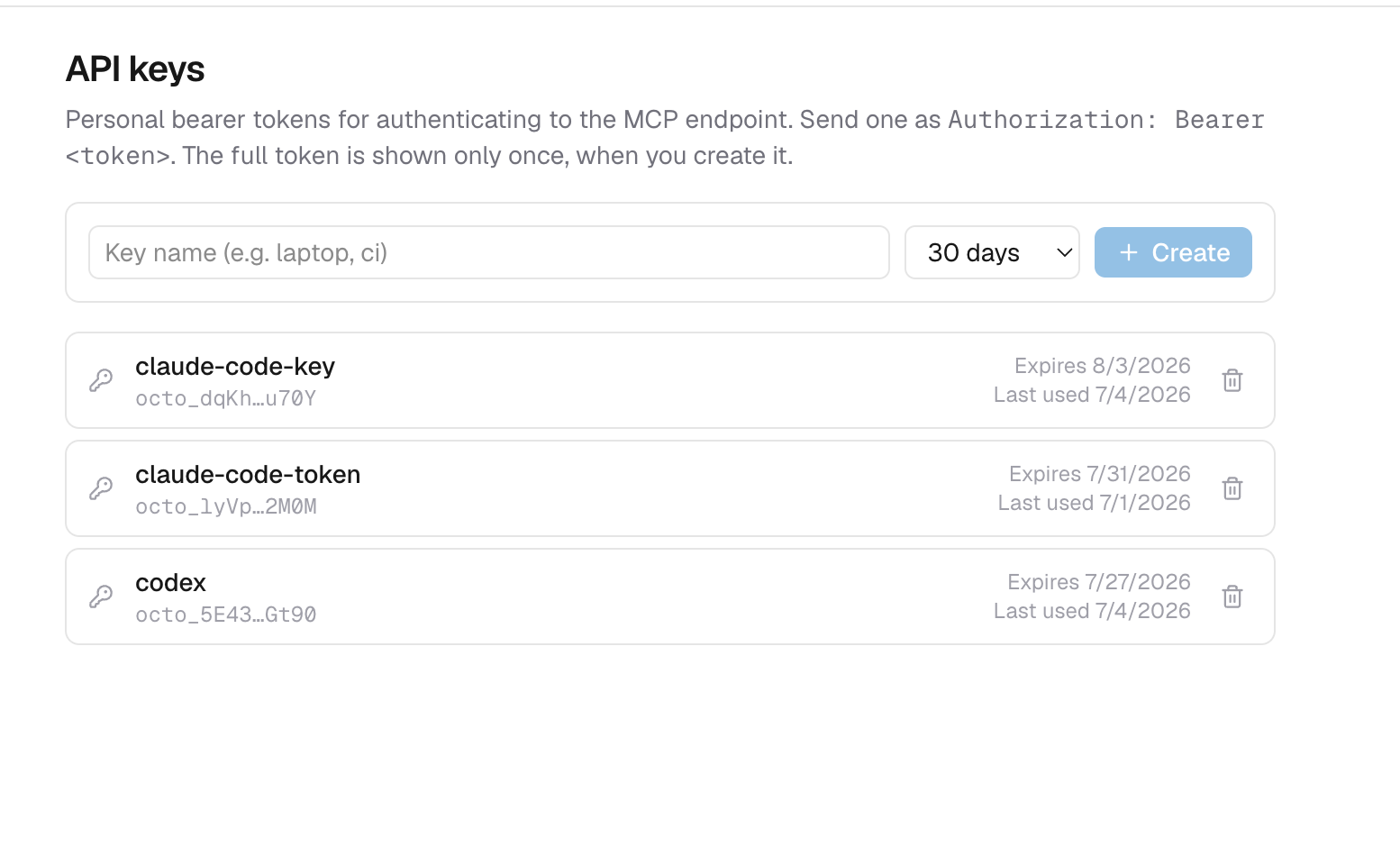
API keys
API keys are per-user bearer tokens for programmatic access, kept for the coming CLI. They are not accepted at /mcp.
- Format:
octo_followed by 32 bytes of random material, base64url-encoded. - Shown once: the plaintext is returned only by the create call. The orchestrator stores a SHA-256 hash, so a database leak exposes no usable keys, plus the first four and last four characters for display.
- Expiry: every key has a TTL, capped at 365 days, enforced on every verification.
- Revocation: deleting a key is a soft revoke (the row is kept for audit); a revoked key stops verifying immediately.
Keys are managed from the platform's account area, backed by these orchestrator endpoints:
| Operation | Endpoint |
|---|---|
| Mint a key (returns the plaintext once) | POST /users/{userId}/apikeys |
| List a user's keys (metadata only) | GET /users/{userId}/apikeys |
| Revoke a key | DELETE /users/{userId}/apikeys/{id} |
| Verify a presented token | POST /apikeys/verify |
Using a key
Send it as a bearer token:
curl https://octo.example.com/mcp \
  -H "Authorization: Bearer octo_..."
The receiving endpoint verifies the token through POST /apikeys/verify, which resolves it to its owning user and records last-use, so machine calls act as, and are attributable to, a real user.
API keys do not reach /mcp. It is an OAuth 2.1 resource server and accepts only access tokens minted by the identity provider — see MCP Authentication. The keys are kept for the coming CLI, which will trade one for a platform token.